On this page
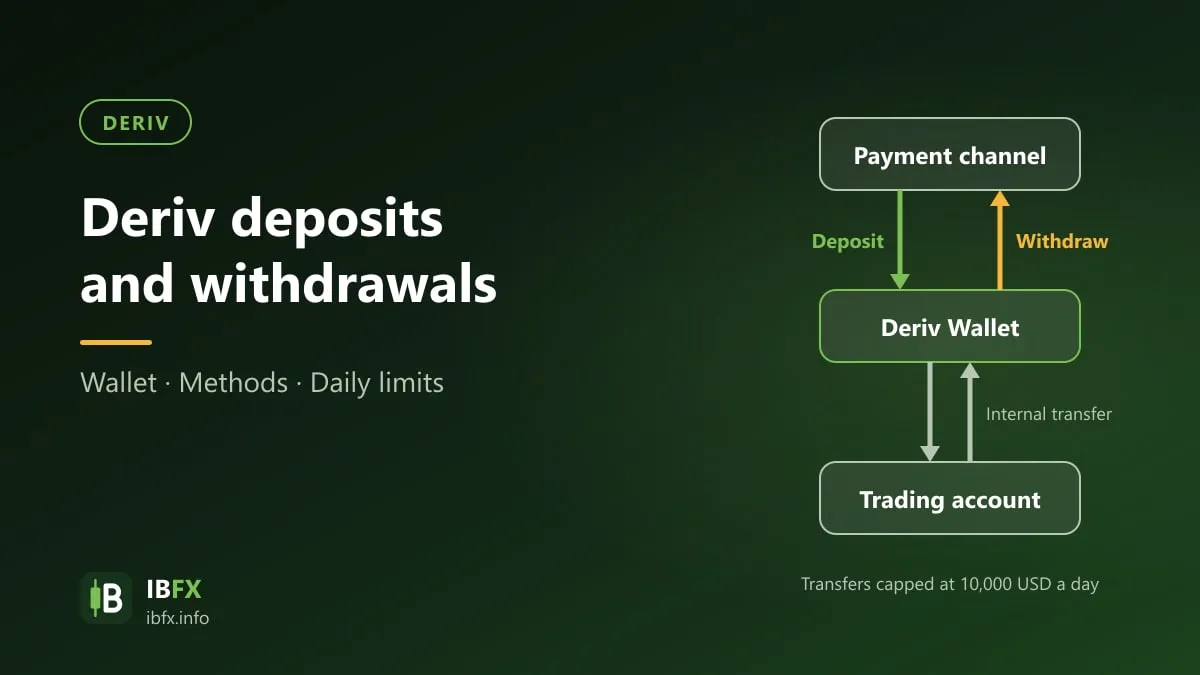
Funding at Deriv works differently from the brokers IBFX has covered so far: money does not go straight into a trading account. It goes into an intermediate wallet, called the Wallet, and you then move it from there into each MT5, cTrader or Deriv Trader account.
Understanding that two-tier structure avoids most of the “I deposited but my account still shows zero” moments. Every figure below was read on deriv.com on Sep 24, 2026.
Quick summary:
- Money travels: payment method → Wallet → trading account.
- The lowest deposit into the Wallet is 5 USD; the specific minimum and maximum depend on the method and are shown the moment you select one.
- Deriv charges no fee to deposit into the Wallet. On withdrawal, the payment method you choose may charge its own fee.
- Wallet to trading account: up to 10 transfers a day, each from 1 USD to 10,000 USD, with a cumulative daily limit of 10,000 USD.
- Which methods you see depends on where you live. The public table on deriv.com is a global one.
The Wallet: the tier to understand first
Per Deriv’s Help centre, the Wallet is the account’s “central hub for managing funds”: where you deposit, hold, transfer and withdraw. You can fund it in USD or in cryptocurrency.
What that means in practice:
- After a deposit, the money sits in the Wallet. Your MT5 account stays at zero until you transfer it across. This is where newcomers panic.
- To switch trading accounts, you move money within the wallet rather than withdrawing and depositing again.
- Withdrawals run the same path in reverse: trading account to Wallet, then Wallet out.
The groups of payment methods
The Payment methods page as read on Sep 24, 2026 lists 8 groups:
| Group | Notes |
|---|---|
| Deriv P2P | Exchange local currency with other users, through a separate app |
| Credit and debit cards | The Help centre names Visa and Mastercard |
| Mobile payments | Mostly country-specific gateways |
| Vouchers | Prepaid top-up codes |
| E-wallets | The Help centre names Skrill and Neteller |
| Cryptocurrencies | Fund the Wallet directly in crypto |
| Crypto on-ramp and off-ramp | Buy crypto with fiat, then deposit |
| Online banking | Direct bank transfer |
For cryptocurrency, the coins Deriv names in its Help centre are Bitcoin, Ethereum, Litecoin, USD Coin, eUSDT, tUSDT and XRP.
This is the part this article cannot check for you. The public table is global and includes gateways that only run in parts of Africa or South America, and Deriv states that available methods depend on where you reside. The list that applies to you is the one inside your own account’s deposit screen, after your profile is approved. Since IBFX did not open a live account, this article gives no country-specific table.
Minimums, maximums and timings
A few general figures from the Help centre and the methods table:
- The lowest deposit into the Wallet is 5 USD. Each method has its own floor; the public table shows rows with minimums of 5, 10 and 15 USD.
- Maximums also vary by method: the table lists ranges such as 5–150, 10–1,000, 10–4,000 and 15–5,000 USD per transaction.
- Both figures appear on screen the moment you select a method. Those are the numbers to trust, not the ones in this article.
- Deriv states that deposits by Visa or Mastercard, or through Skrill or Neteller, are typically instant once the payment is confirmed.
Fees
The Help centre answers this briefly: Deriv charges no fee to deposit into the Wallet. On withdrawal, the payment method you select may charge a withdrawal fee, depending on the method.
In other words the cost sits with the channel, not the broker. Before picking a withdrawal channel, ask two questions:
- What does that intermediary charge per withdrawal?
- If the money has to be converted out of USD, how far is its exchange rate from the market rate?
The second usually costs more than the first, and few people calculate it. Withdrawing 200 USD at a rate 2% off the market costs 4 USD — normally more than the transaction fee.
Moving money from the Wallet to a trading account
This is the step people skip. From the Portfolio tab, pick the source currency, choose Transfer, pick the destination account (for example MT5 CFDs | Standard), enter the amount and confirm. Quick-select buttons for 25%, 50%, 75% and 100% are there too.
The limits Deriv published on Sep 24, 2026:
| Limit | Wallet to Wallet | Wallet to trading account |
|---|---|---|
| Transfers per day | up to 10 | up to 10 |
| Minimum per transfer | 1 USD | 1 USD |
| Maximum per transfer | 10,000 USD | 10,000 USD |
| Cumulative daily total | 10,000 USD | 10,000 USD |
Once you hit the limit you wait for the next day. The 10,000 USD figure is generous for most personal accounts, but if you intend to move a large sum it is worth knowing in advance so you can split it, rather than discovering it while the market is running.
Deriv P2P
This is Deriv’s answer to funding in local currency without an international card: you exchange directly with other users at a rate the two of you agree, through a separate app available on Android, iOS and Huawei, or on desktop.
The process Deriv describes has three steps: find or post an ad at the rate you want, settle the payment with the counterparty, then complete the transaction. One condition to remember: every order must be completed and confirmed within 1 hour.
Before using it you must log in to your Deriv account, complete verification and choose a nickname. Deriv also states that whether Deriv P2P is available at all depends on your country of residence.
A few things to weigh up with this route:
- You are sending money to an individual, not to the broker. Stay inside the app’s flow and do not agree anything privately on the side — stepping outside the system means losing its protections.
- The rate is whatever the two parties agree, so compare several ads before accepting, exactly as you would changing money anywhere else.
- The one-hour window means not starting an order when you are about to leave your desk.
What holds a withdrawal up
None of this is specific to Deriv; it is the common pattern at every broker, and it is the usual reason people conclude that “the broker won’t let me withdraw”:
- Names that do not match. The bank account or wallet receiving the money must be in the broker account holder’s own name. No broker pays a third party.
- Verification not approved. Verify your documents before you deposit, not when you want to withdraw. See how to open a Deriv account.
- Withdrawing to a different channel than you deposited from. Most brokers require withdrawals back through the funding channel, at least up to the amount deposited, under anti-money-laundering rules. IBFX has not verified Deriv’s specific rule because no live account was opened — ask support before funding through a channel you do not intend to withdraw through.
- Forgetting the transfer step. Money still sitting in a trading account has to be moved back to the Wallet before it can leave.
- Open positions. Money used as margin cannot be withdrawn.
What to do the first time
The safe order, at any broker:
- Get your documents verified first.
- Deposit a small amount, enough for a few trades at the smallest size. If you do not have an account yet, sign up with Deriv here.
- Withdraw part of it as a test and time how long it takes and what it costs.
- Only once that round trip runs smoothly should you consider a larger amount.
One successful test withdrawal tells you more than any table of figures — including the ones in this article. And remember the part that matters more than payments: which entity signs the agreement with you, in the Deriv review; for picking an account, see Deriv account types.
In Vietnam, offshore Forex brokers are unlicensed and trading through them is not protected by law. See is Forex trading legal in Vietnam.