On this page
Once you have opened a Tickmill account and had your file approved, you have to fund it before you can trade, and it is worth knowing how to take the money back out first. This guide covers deposits and withdrawals at Tickmill: the methods, the limits, the timings, the fees, and the rules that most often leave a withdrawal stuck.
This article was written in 2023 and rewritten for readers outside Vietnam on Sep 23, 2026 from Tickmill’s international website: the Deposits & Withdrawals conditions page, the Deposits, Withdrawals and Wallets sections of the FAQ, and the Client Service Agreement of Tickmill Ltd (Seychelles). The screenshots of the client area are the ones from the original, taken on the Vietnamese interface in 2023 and kept here because the buttons sit in the same places in the English version.
A note on the law and on safety: moving money from a bank account in Vietnam to fund a Forex broker registered abroad may breach foreign exchange control rules. The bank can refuse or hold the transfer, and Vietnamese law does not protect you if there is a dispute. Wherever you live, check the rules that apply to you before you send money abroad. Deposit only inside the broker’s own client area, never through an individual who says they work for the broker or are its IB, and only with money you can afford to lose. The methods, limits and timings below are what Tickmill published on Sep 23, 2026 and can change at any time.
Before you deposit
- Your file has to be approved. Tickmill has you upload your documents and wait for approval before you can open a live trading account and fund it. On top of the standard checks, the broker may ask for further verification or for evidence of the source of the funds under anti-money-laundering rules.
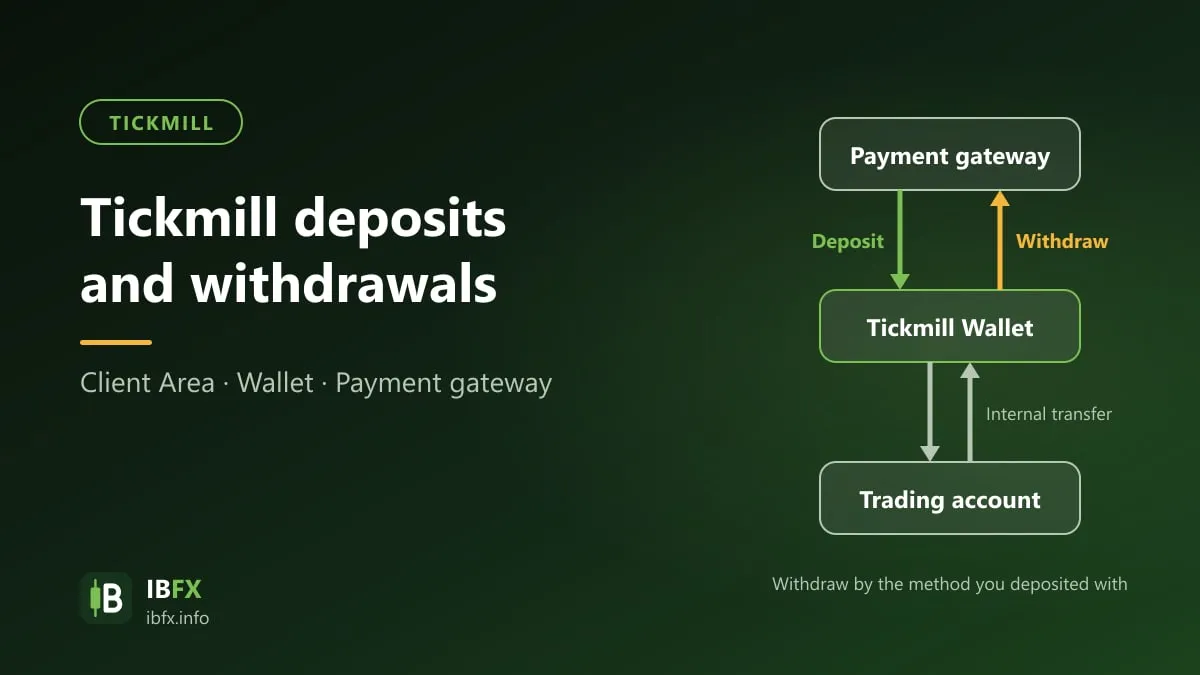
- The wallet and the trading account are two different things. Money is deposited into a wallet in the client area, and you transfer it from the wallet to a trading account before you place an order. Tickmill’s own reason for the split is worth knowing: funds left in the wallet are not exposed to the open positions on your trading account. Wallets can be held in USD, EUR, GBP or ZAR, which of those you can open depends on your country of residence, and ZAR is only available to residents of South Africa. A withdrawal is paid out in the base currency of the wallet it leaves.
- Only payment methods in your own name. Tickmill states that every deposit has to come from a payment method in your own name and that third-party payments are not accepted. For fraud prevention it may ask for card documentation after a card deposit.
- Decide how you will take money out first. Withdrawals are paid back to the method you deposited from, so fund the account with the method you also want to receive money on.
The deposit and withdrawal methods
From the Deposits & Withdrawals page on Sep 23, 2026. Every withdrawal request, whatever the method, is processed by Tickmill within one working day; the last column is the time the money then needs to reach you.
| Method | Currencies | Minimum deposit | Minimum withdrawal | Deposit time | Time to receive a withdrawal |
|---|---|---|---|---|---|
| Bank transfer (wire) | USD, EUR, GBP, ZAR | 100 | 25 | Processed within 1 working day; arrives in 2 – 7 working days | 2 – 7 working days |
| Visa, Mastercard | USD, EUR, GBP | 100 | 25 | Instant | Up to 8 working days |
| Skrill | USD, EUR, GBP | 100 | 25 | Instant | Instant |
| Neteller | USD, EUR, GBP | 100 | 25 | Instant | Instant |
| Crypto Payments | EUR, USD, GBP | 100 | 25 | Instant, 24/7 | About 12 – 48 hours |
| UnionPay | CNY | CNY 700, or 100 in EUR, USD or GBP | 25 | Instant | Up to 48 hours |
The FAQ states the same two figures in plain words: the starting deposit for every account type is 100 USD, and it may vary with the base currency; the minimum withdrawal is 25 USD, EUR or GBP.
Some of these methods are only open to residents of certain countries, so the list inside your own client area may be shorter than the one above. Tickmill also notes, as every broker does, that online payment systems can fail, lag or go down, and that using them means accepting that.
Fees. Tickmill charges nothing on deposits and nothing on withdrawals. Intermediary banks and e-wallet providers can still charge their own fees, which are outside the broker’s control. On top of that, the zero fees policy covers any deposit of 5,000 USD or equivalent made as a single bank wire transfer: Tickmill reimburses the transaction fees up to 100 USD or equivalent if you email a copy of the bank statement or other proof of the deposit to the support team, and the refund is made within one calendar month of the deposit date. Note separately that the broker reserves the right to charge an inactivity fee where there is no trading activity — the amounts are in the withdrawal rules further down.
Tickmill rebuilt this page during September 2026. The local payment gateways and the local-currency bank channels that earlier versions of it carried are no longer listed: the international page now shows the six methods above and nothing else, priced in USD, EUR, GBP, ZAR and CNY.
How to deposit
Step 1: Sign in to the client area
Sign in to the client area on the Tickmill website or in the Tickmill app, with your email address and password.
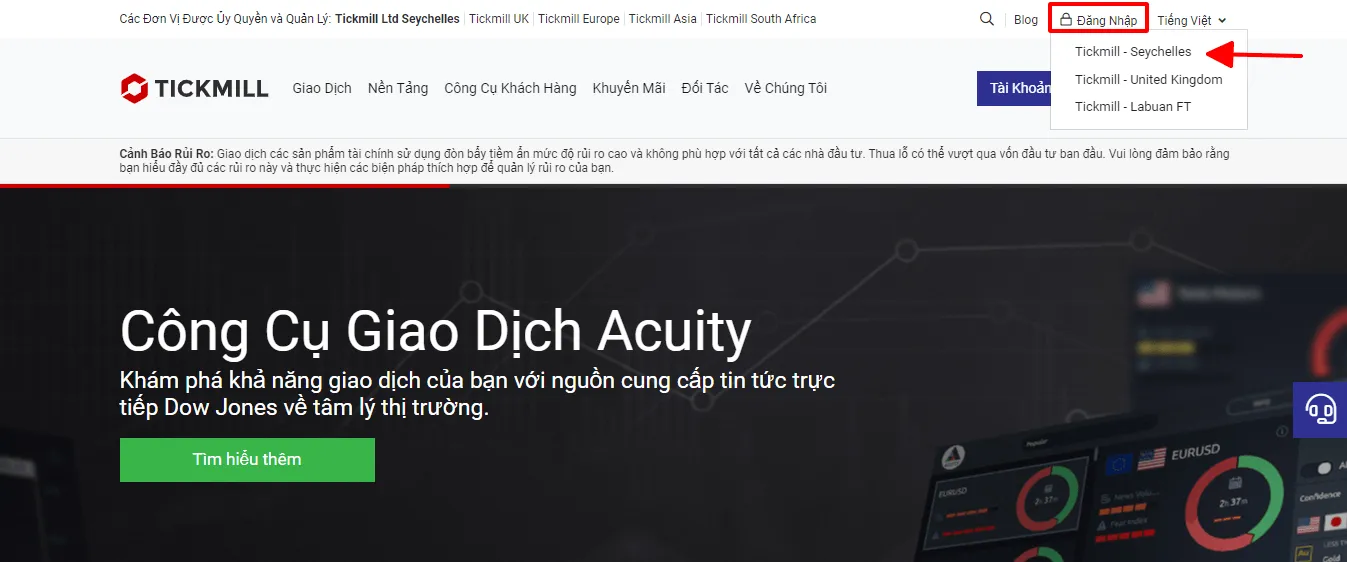
Screenshot from 2023. The list of entities in that top bar has changed since: the article uses figures re-read from the Tickmill website, while the screenshot is kept as a record. Trust the broker’s live site.
The screenshot shows the Vietnamese interface; the buttons and labels sit in the same places in the English version.
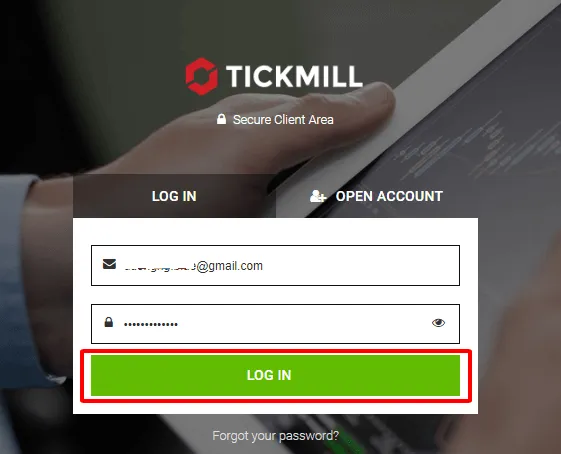
The screenshot shows the Vietnamese interface; the buttons and labels sit in the same places in the English version.
Step 2: Choose Deposit and pick a wallet
Select Deposit from the panel beside the wallet you want to fund, or from the navigation tab. If you started from the Wallets screen the wallet is already selected; otherwise pick it from the dropdown.
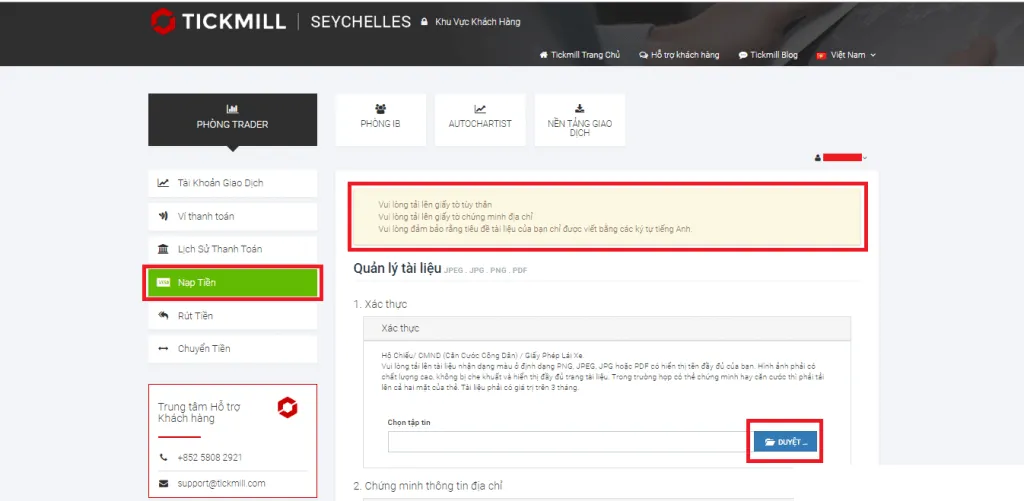
The screenshot shows the Vietnamese interface; the buttons and labels sit in the same places in the English version.
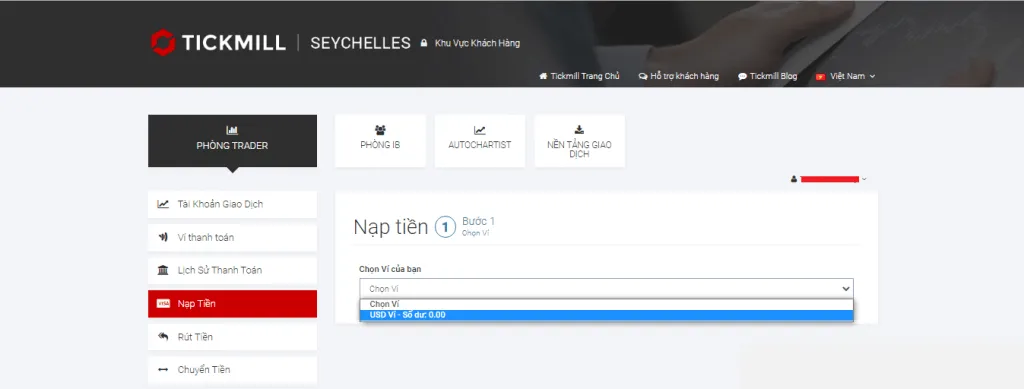
The screenshot shows the Vietnamese interface; the buttons and labels sit in the same places in the English version.
Step 3: Choose a payment method
Pick from bank wire, credit or debit card, Crypto Payments, Skrill, Neteller or UnionPay — whichever of them your country’s list offers.
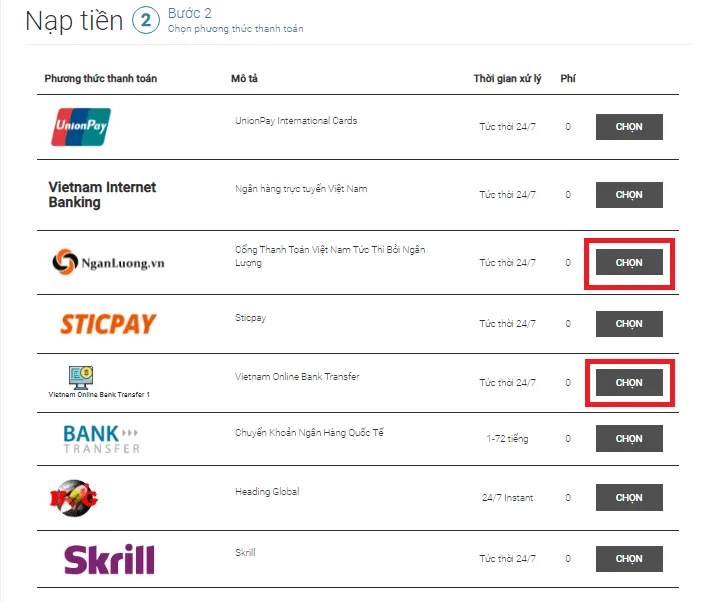
The screenshot shows the Vietnamese interface; the buttons and labels sit in the same places in the English version.
Step 4: Enter the amount and confirm
Enter the amount, at or above the minimum for the method, accept the terms, click Confirm, and follow the provider’s own instructions on screen to finish the payment.
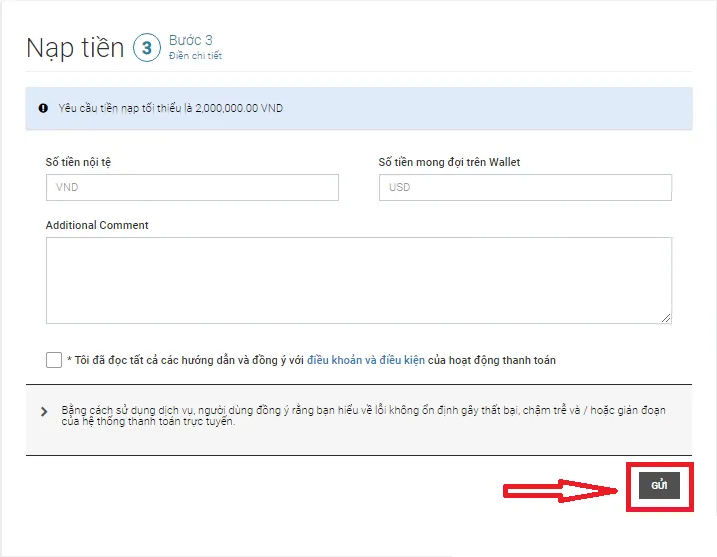
The screenshot shows the Vietnamese interface; the buttons and labels sit in the same places in the English version.
The money appears in your wallet balance immediately or within one working day, and the full detail sits under the Transaction History tab. From there, transfer it to a trading account: in the Wallets section choose Transfer, set the source and the destination, enter the amount and confirm. You can move money between a trading account and a wallet of the same currency, or between two wallets of different currencies.
If a card deposit fails, check the card details you typed, the expiry date, the funds available, and whether your bank authorizes online trading payments at all. If it keeps failing, use another method or call the card issuer. One rule that saves people a lot of money: Tickmill says it will never ask for your full card number, your CVV code or your PIN, so treat any request for them as an attack and report it to support.
How to withdraw
Step 1: Sign in to the client area
Sign in exactly as you did to deposit.
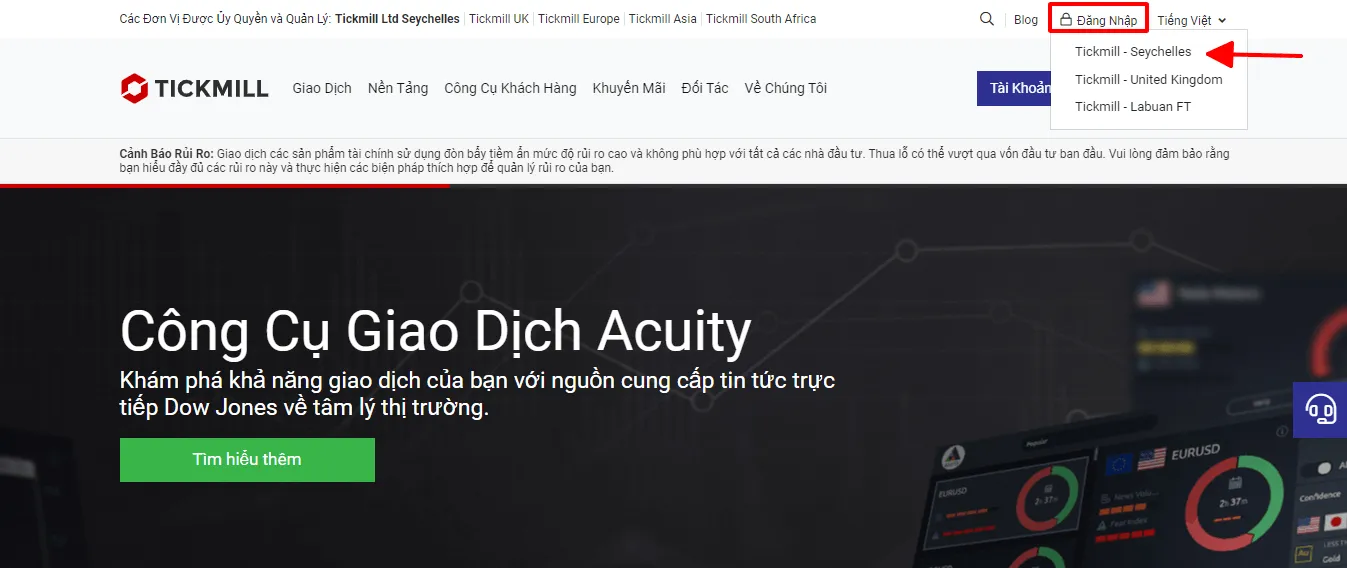
Screenshot from 2023. The list of entities in that top bar has changed since: the article uses figures re-read from the Tickmill website, while the screenshot is kept as a record. Trust the broker’s live site.
The screenshot shows the Vietnamese interface; the buttons and labels sit in the same places in the English version.
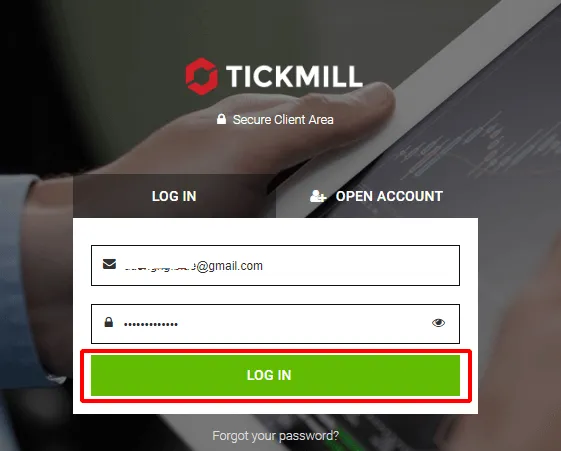
The screenshot shows the Vietnamese interface; the buttons and labels sit in the same places in the English version.
Step 2: Choose Withdraw and pick a wallet
Select Withdraw from the panel beside the wallet, or the Withdrawal tab in the navigation, then pick the wallet — it is selected for you if you clicked through from the Wallets screen.
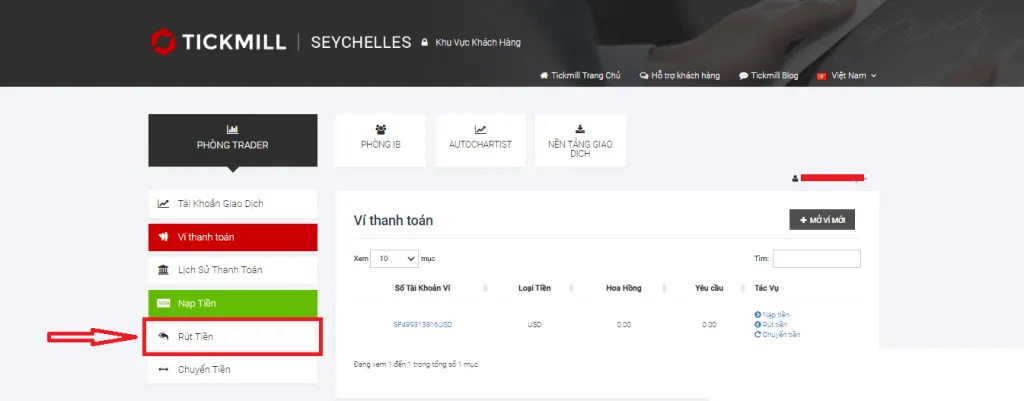
The screenshot shows the Vietnamese interface; the buttons and labels sit in the same places in the English version.
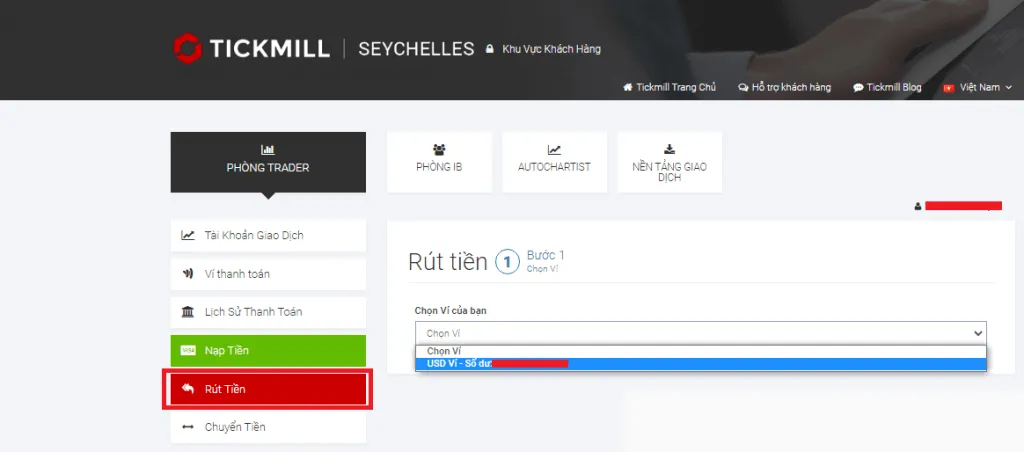
The screenshot shows the Vietnamese interface; the buttons and labels sit in the same places in the English version.
Step 3: Choose the method that will receive the money
Pick the method, keeping the return-to-source rule below in mind.
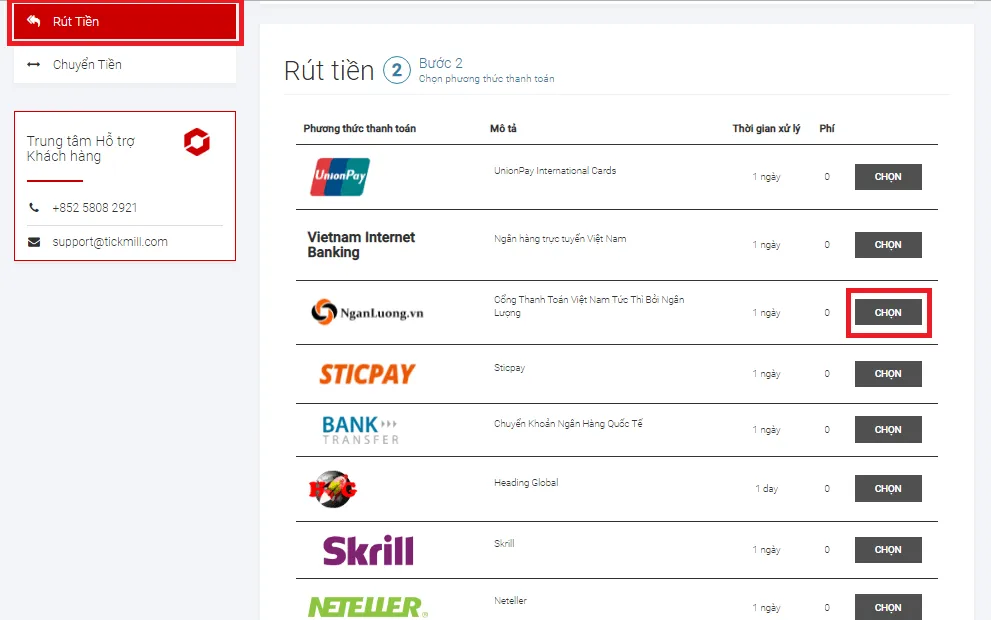
The screenshot shows the Vietnamese interface; the buttons and labels sit in the same places in the English version.
Step 4: Enter the amount and the details, then send the request
Enter the amount. For a bank transfer, select or add the receiving account: the bank name, the account holder’s name exactly as it appears on your Tickmill file, the account number and the branch. Accept the terms, submit the request, and follow its status in the Transaction History tab.
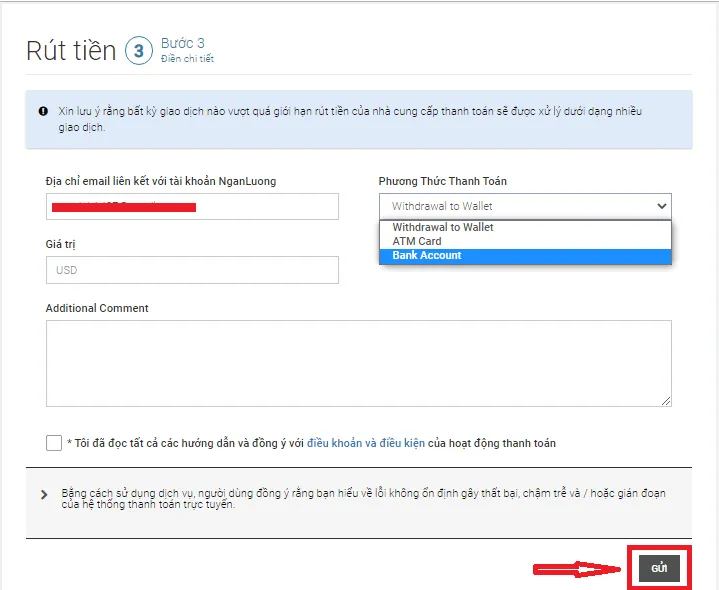
The screenshot shows the Vietnamese interface; the buttons and labels sit in the same places in the English version.
Withdrawal rules to know
- Back to the method you deposited from. Tickmill processes withdrawals to the payment method you originally funded with. It is an anti-fraud rule, and it means money returns through channels that have already been verified.
- Cards are repaid first. A withdrawal up to the total you deposited by card goes back to that card; anything above that total goes to the alternative method you choose. Tickmill’s own example: you deposit 100 USD by card and make 1,000 USD of profit, so withdrawing 1,000 USD sends 100 USD back to the card and the remaining 900 USD by bank wire, e-wallet or whatever you picked.
- Several methods means the card still comes first. Another of the broker’s examples: you deposit 400 USD through Skrill and 100 USD by card, then withdraw 300 USD — 100 USD goes back to the card and 200 USD to Skrill.
- In your own name. The account, card or wallet receiving the money has to be yours. The FAQ adds that on request the profit can be sent by other payment methods registered in your name.
- Currency. Tickmill processes payments in EUR, GBP, ZAR and USD only. Receive a withdrawal in any other currency and your bank or e-wallet converts it itself, possibly charging a conversion fee for doing so.
- Timings are stated two ways. Most withdrawals are processed within one working day. The guidance text on the Deposits & Withdrawals page says a bank wire may then take 1 – 3 working days depending on your bank, while the method table on the same page says 2 – 7 working days. Plan for the longer figure. The FAQ’s own breakdown of arrival times is international bank wire 2 – 7 working days, card withdrawals up to 8 working days, and everything else usually within one working day.
- Inactive accounts and dormant client areas. Under the Client Service Agreement, a trading account is classed as inactive after at least 60 calendar days with no trading, no open positions, no deposits or withdrawals and no platform login, if its balance is 50 GBP, EUR or USD or less (250 PLN, 200 ZAR). Its balance is then moved to the wallet and the trading account is deactivated and archived — you can open a new one whenever you want, and money in the wallet can be withdrawn at any time. A whole client area is classed as Dormant after 12 months and 10 days of no activity if the wallets and trading accounts together hold 50 GBP, EUR or USD or less (250 PLN); balances move to the wallets, the trading accounts are deactivated, and you lose access to the client area until you email support@tickmill.com to reactivate it. A dormant client area is charged an inactivity fee of 10 USD, EUR, GBP or CHF (40 PLN) per quarter, and if the wallet balance is at or below that amount the remainder is written off. In short, withdraw what is left if you stop trading.
- Abusing the payment methods costs you the account. Tickmill reserves the right to close an account it considers to be deliberately abusing its payment methods, and to charge the transfer and refund fees it incurs.
If the money has not arrived
- Check the status of the request in the Transaction History tab.
- Compare the elapsed time with the processing time and the arrival time for the method you used.
- Contact support at support@tickmill.com with the transaction reference and screenshots. The support team handles payment questions Monday to Friday, 07:00 to 20:00 GMT.
- Remember that Tickmill will never ask for your full card number, your CVV code or your PIN. If you get a request like that, report it to support straight away.
Be wary of anyone who contacts you privately and offers a “fast withdrawal” or to “unlock your account” if you send more money: see how to spot forex scams.
In closing
Tickmill funds accounts in USD, EUR, GBP, ZAR and CNY through six methods, takes 100 as a minimum deposit and 25 as a minimum withdrawal, processes withdrawal requests within one working day, and charges nothing either way. Three rules to keep in mind: the money has to be in your own name, a withdrawal goes back to the method you deposited from with cards repaid first, and it is worth withdrawing a small amount before you fund the account properly. After you deposit, always set a stop loss, keep your leverage low, and trade only with money you can afford to lose. To pick the right account first, see the Tickmill Classic and Raw accounts.