On this page
Once your account is open and verified you have to fund it before you can trade, and it pays to know how to get the money back out before you put any in. This guide covers deposits and withdrawals at HFM (HotForex): what methods exist, how the limits are set, how long each one takes, what HFM charges, and the rules that most often get a withdrawal refused.
This article was written in 2023 and rewritten for readers outside Vietnam on Sep 23, 2026 from HFM’s international website (hfm.com/int/en): the Deposit Options page, the Withdraw Options page, the Withdrawal FAQs and the general FAQs. The screenshots of the client area are the ones from the original, taken on the Vietnamese interface in 2023 and kept here because the buttons sit in the same places in the English version.
See also: How to open an HFM account
A note on the law and on safety: moving money from a bank account in Vietnam to fund a Forex broker registered abroad may breach foreign exchange control rules. The bank can refuse or hold the transfer, and Vietnamese law does not protect you if there is a dispute. Wherever you live, check the rules that apply to you before you send money abroad. Deposit only through the broker’s own client area, never through an individual who says they work for the broker or are its IB, and only with money you can afford to lose. The methods, limits and timings below are what HFM published on Sep 23, 2026 and can change at any time.
Before you deposit
- Get your file approved first. HFM’s FAQ says documents are checked by the verifications department within 48 hours, and that deposits are credited to the account only after the documents have been approved and the myHF area is fully activated. Upload them inside myHF, or send them to backoffice@hfm.com.
- Use payment methods in your own name. HFM’s stated policy is to return all funds to their original source, and a card withdrawal is processed back to the same card and through the same payment processor used for the deposit. A payment from, or to, somebody else’s account cannot be matched to your file. The detailed rule sits in the Client Agreement on HFM’s Legal Documentation page.
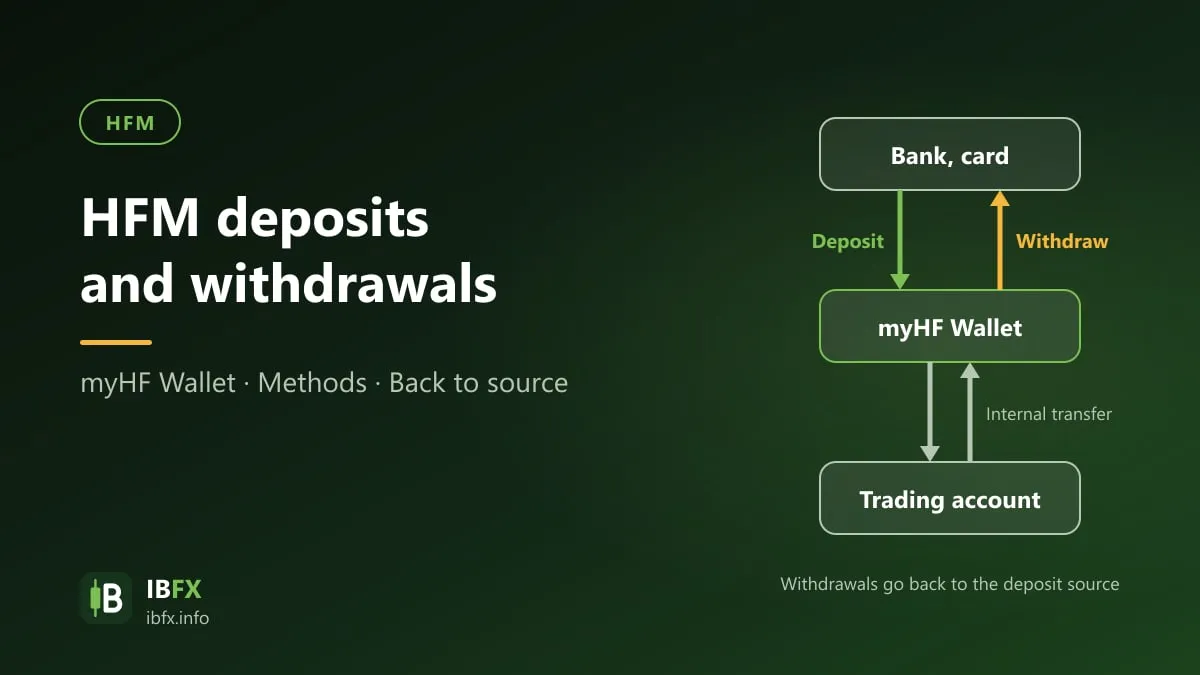
- Understand the myHF wallet. Your myHF account is a wallet, created automatically when you register. Deposits, withdrawals and internal transfers to and from your trading accounts all run through it, and you create your live and demo trading accounts there too. Money sitting in the wallet is not tradable capital: transfer it to a trading account before you place an order.
- Decide how you will take money out before you put money in. HFM refunds the original source first, and the list of methods that can receive a withdrawal is shorter than the list that can send a deposit. If a method you are about to use does not appear on the withdrawal side, ask support how the money would come back before you use it.
The deposit methods
There is one thing to understand about HFM’s Deposit Options page before you read any figure off it: the table is built for the country on your profile. Every regional address on hfm.com redirects to the international site, and the international site then fills the table with the payment channels, the currency and the amounts of the country it detects. When IBFX opened the page on Sep 23, 2026 the table was priced in the local currency of the country we were browsing from, with local payment channels in it, so the minimum and maximum amounts on that view say nothing about what you will see. Open the page yourself and read your own table.
What does not change with the country is the structure of the page, the methods that are global, and the fee policy. HFM groups the methods into Bank Transfers, Credit/Debit Cards and Alternative, and states at the top of the page: transactions are available 24/7, and HFM does not apply any deposit fees.
From the Deposit Options page on Sep 23, 2026, for the methods that are not tied to one country:
| Method | Deposit time | HFM’s deposit fee |
|---|---|---|
| International wire transfer | 2 to 7 business days | None, for deposits above the minimum shown for your country |
| Visa, Mastercard | Up to 10 minutes | None |
| Skrill | Up to 10 minutes | None |
Alongside those, the Bank Transfers group carries the local bank transfer channels of your country where HFM has them, and the Alternative group carries local wallets and payment gateways. Which of them you get, in which currency, and with what minimum and maximum, depends entirely on where you are registered. HFM does not publish one global figure for either the minimum or the maximum deposit, so this guide does not quote one.
Two more things the table does not tell you. HFM charging nothing does not stop your own bank or payment provider from charging its own fee. And your daily transfer ceiling is set by your bank and by the way you authorize payments, not by HFM, so check with the bank before you send a large amount.
How to deposit
Step 1: Sign in to myHF
Sign in to the myHF client area on HFM’s official website or in the HFM app, with the email address and password you registered. Read the address bar carefully before you type your password, and never sign in through a link sent to you in a message.
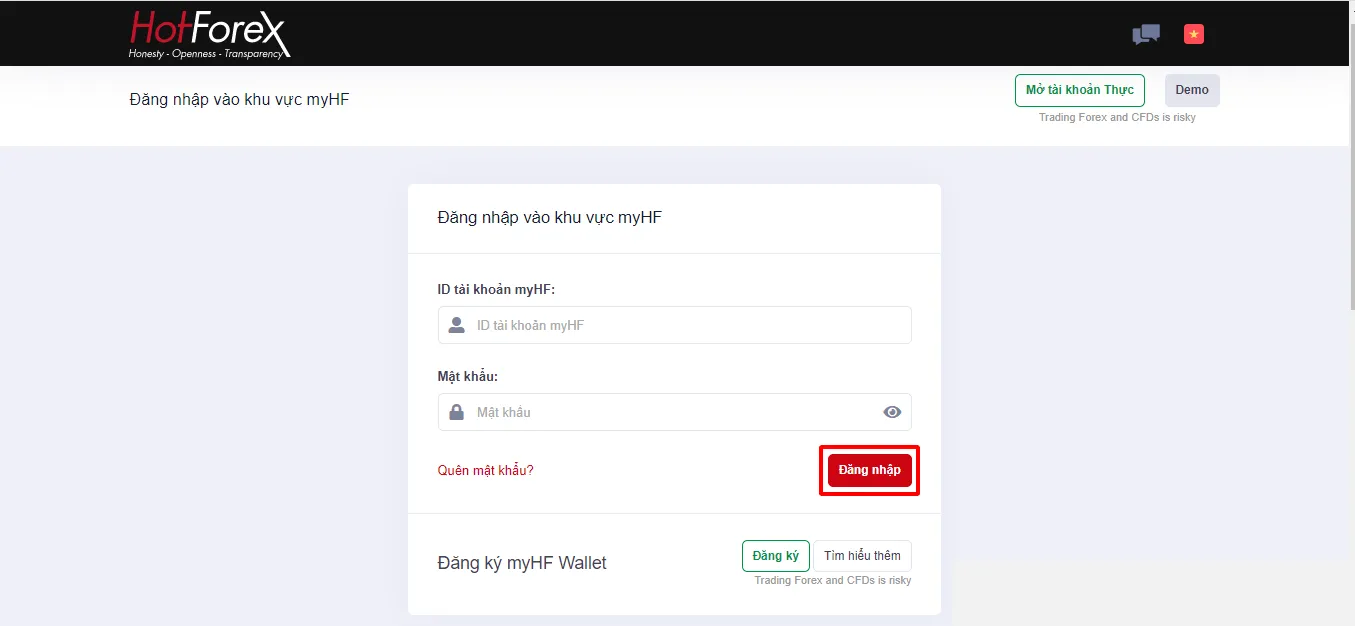
The screenshot shows the Vietnamese interface; the buttons and labels sit in the same places in the English version.
Step 2: Choose Deposit and pick a method
Select Deposit, then pick a method from the list your country’s table offers. The Deposit button next to each row on the Deposit Options page takes you to the same place.
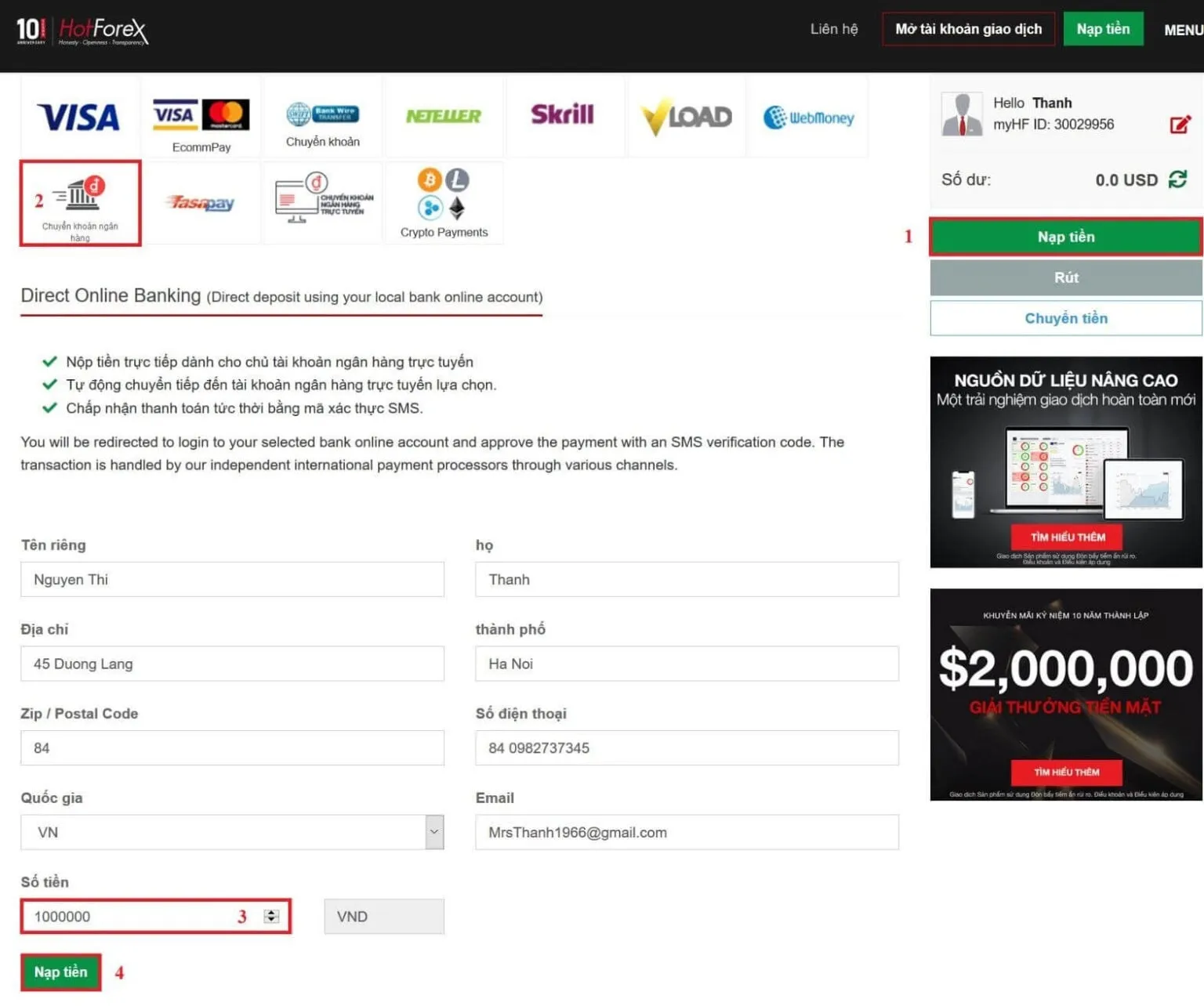
The screenshot shows the Vietnamese interface; the buttons and labels sit in the same places in the English version.
Step 3: Enter the amount and confirm
Enter the amount in the currency the method is denominated in, check it against the minimum and maximum on your row, and confirm. HFM then hands you over to the payment provider.
Step 4: Complete the payment with the provider
What happens next belongs to the provider, not to HFM: a card form, a redirect to your bank, a QR code to scan in your banking app, or a wallet login. Two rules hold whatever the screen looks like:
- Never type your internet banking password into a page that is not your bank’s. If the method offers a QR code you scan inside your own banking app, prefer it — you authorize the payment in the bank’s app and no password leaves it.
- Never read a one-time code out to anyone, including somebody who says they are from the broker or from your bank. A code is for the screen in front of you and nothing else.
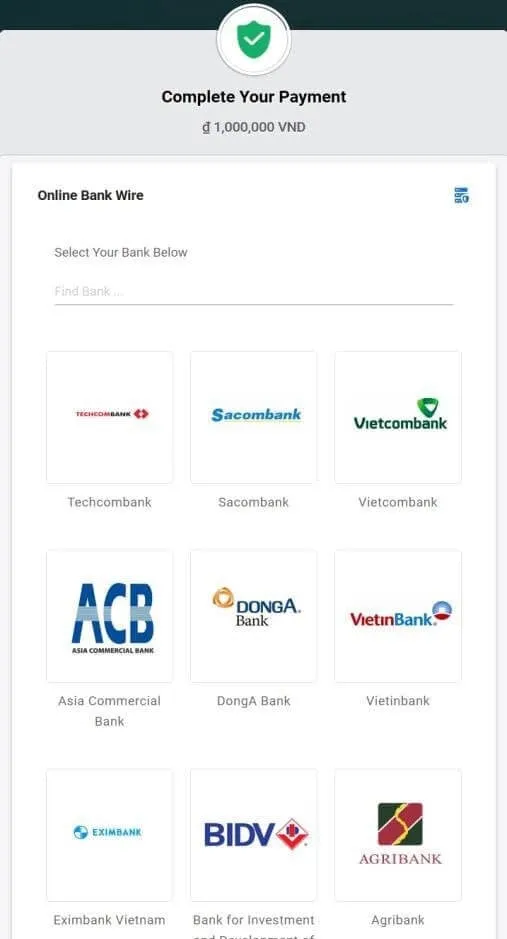
The screenshot shows the Vietnamese interface; the buttons and labels sit in the same places in the English version.
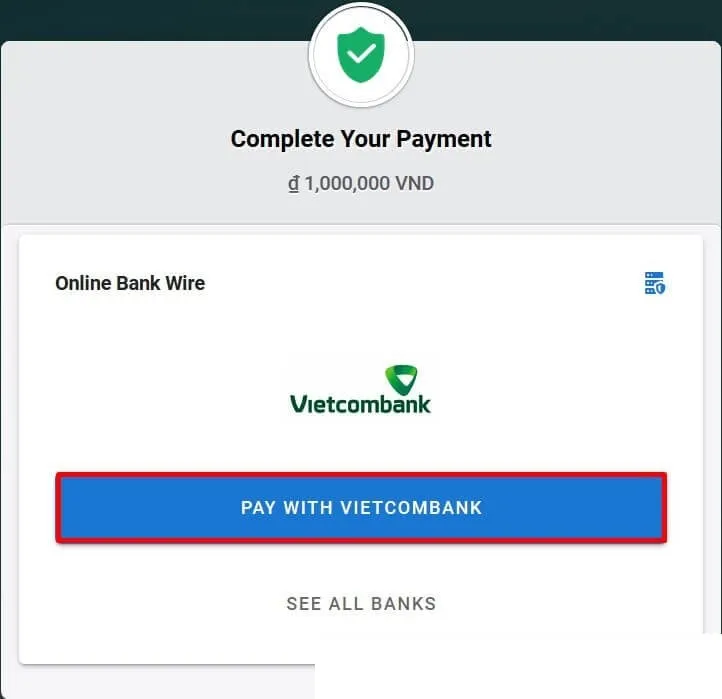
The screenshot shows the Vietnamese interface; the buttons and labels sit in the same places in the English version.
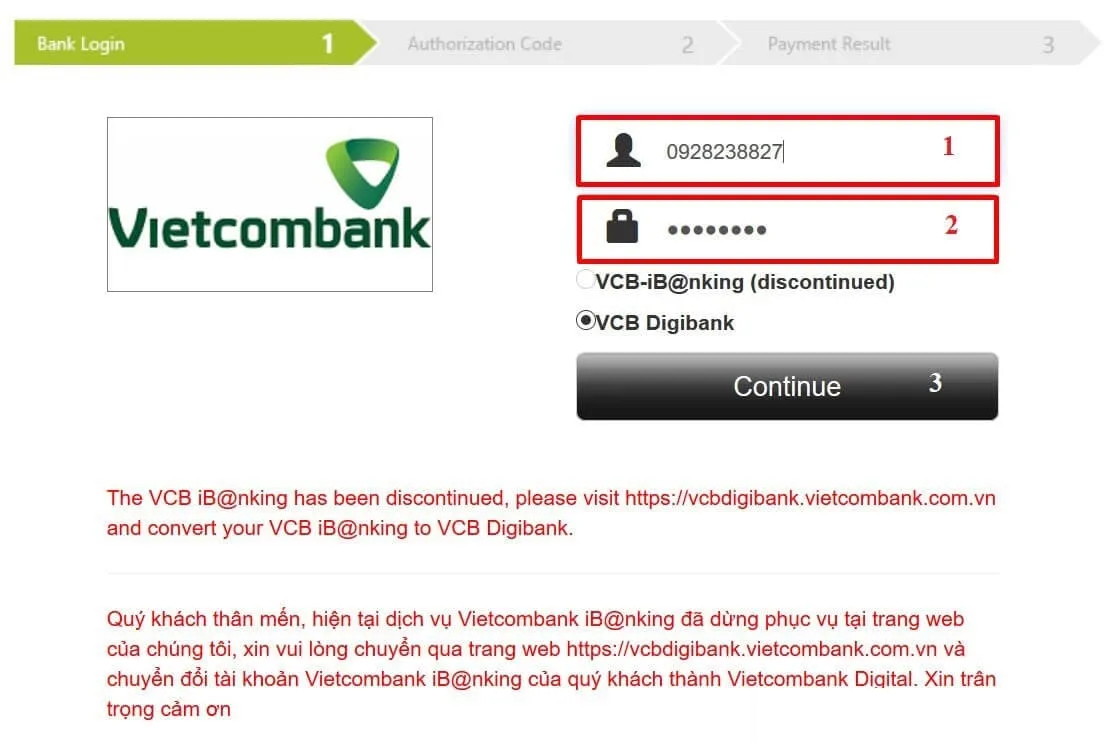
The screenshot shows the Vietnamese interface; the buttons and labels sit in the same places in the English version.
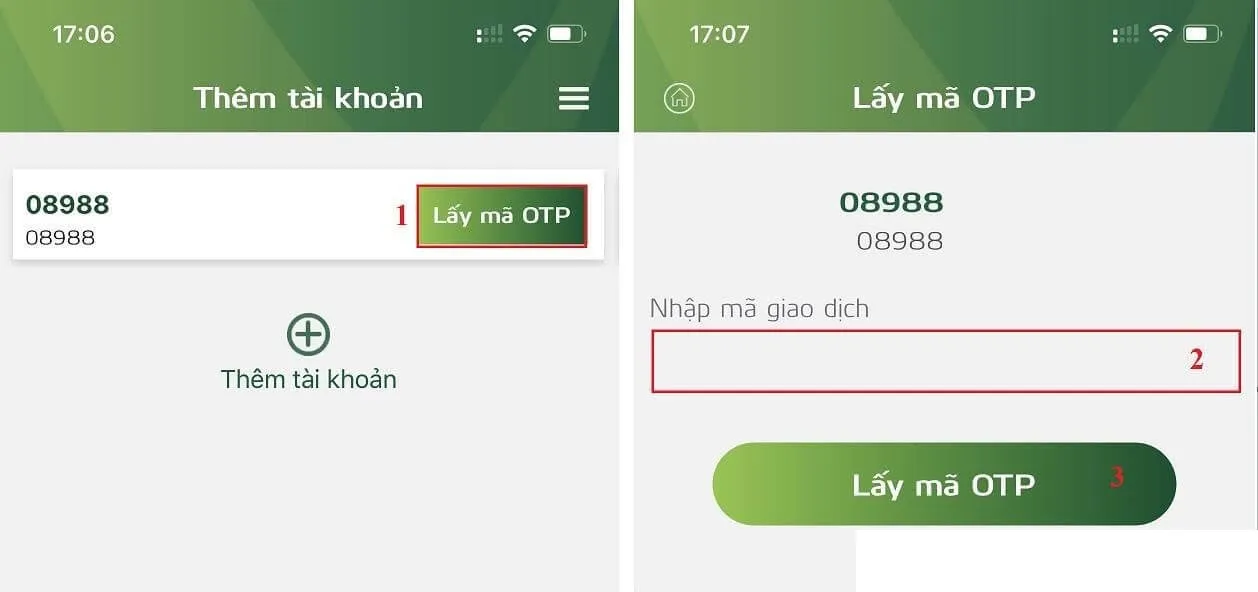
The screenshot shows the Vietnamese interface; the buttons and labels sit in the same places in the English version.
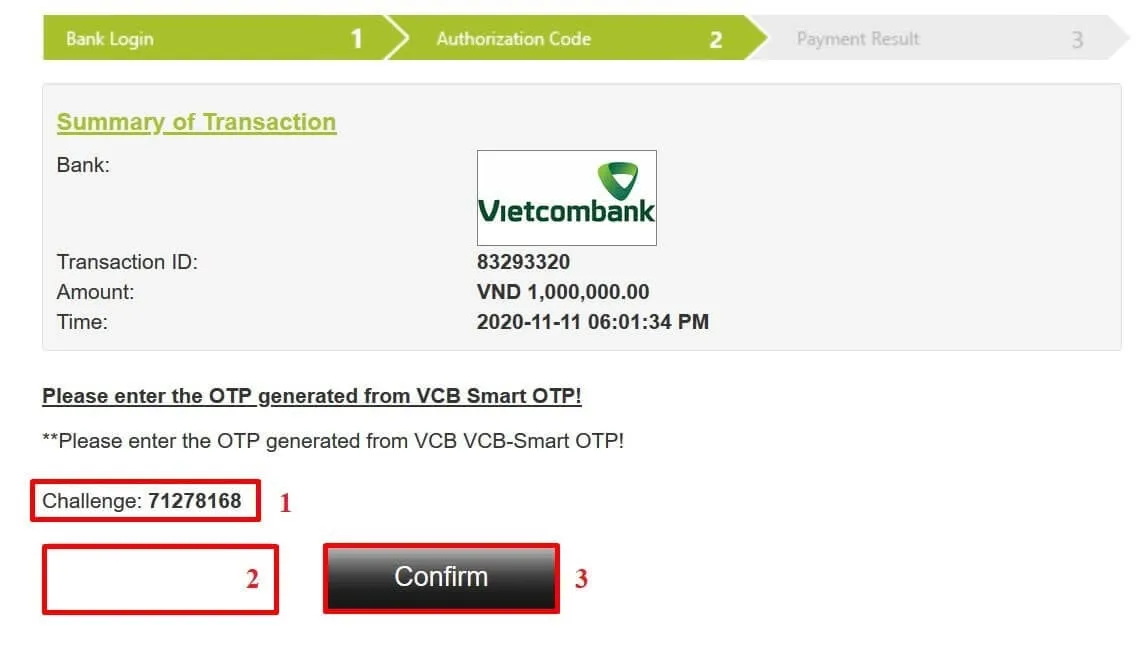
The screenshot shows the Vietnamese interface; the buttons and labels sit in the same places in the English version.
Checking the status of a deposit
In myHF, open your wallet account and look at its transaction history. The list shows deposits and withdrawals with the status of each one. Once the money is in the wallet, use the internal transfer function to move it to the trading account you want to trade.
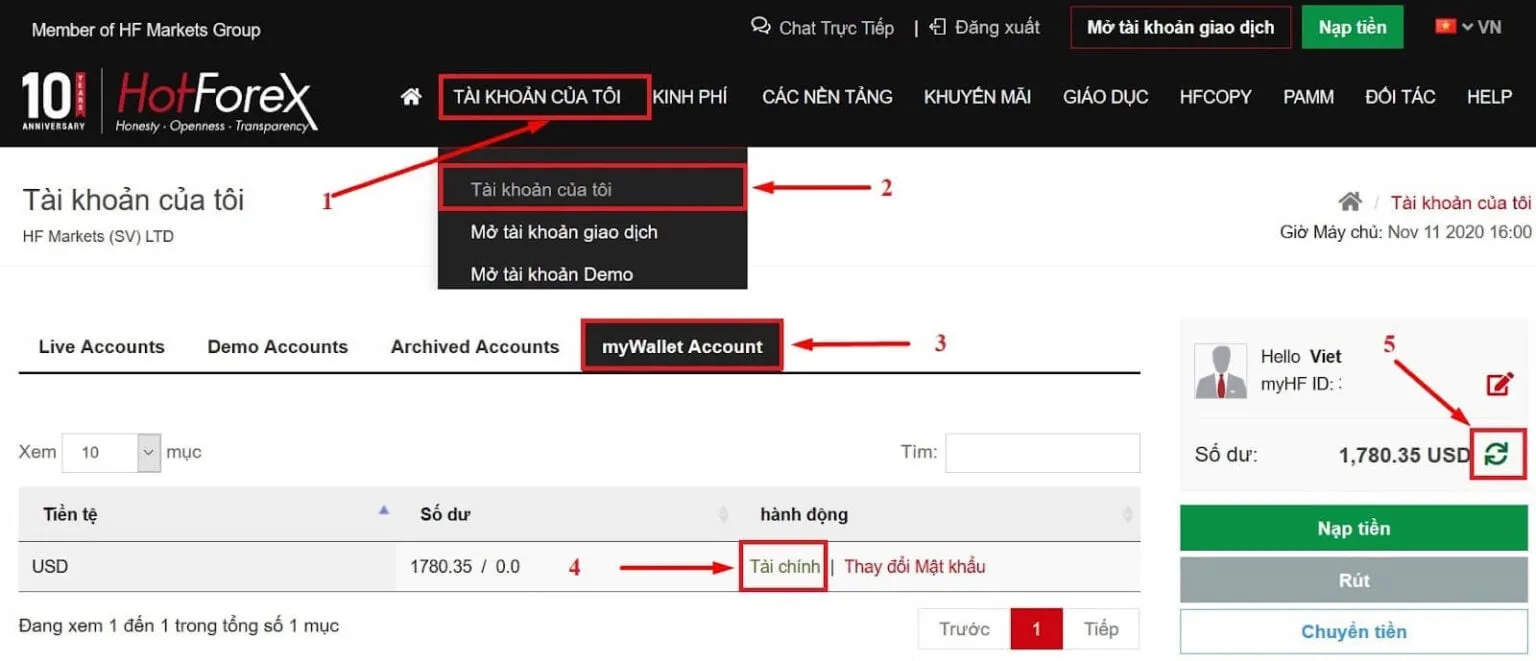
The screenshot shows the Vietnamese interface; the buttons and labels sit in the same places in the English version.
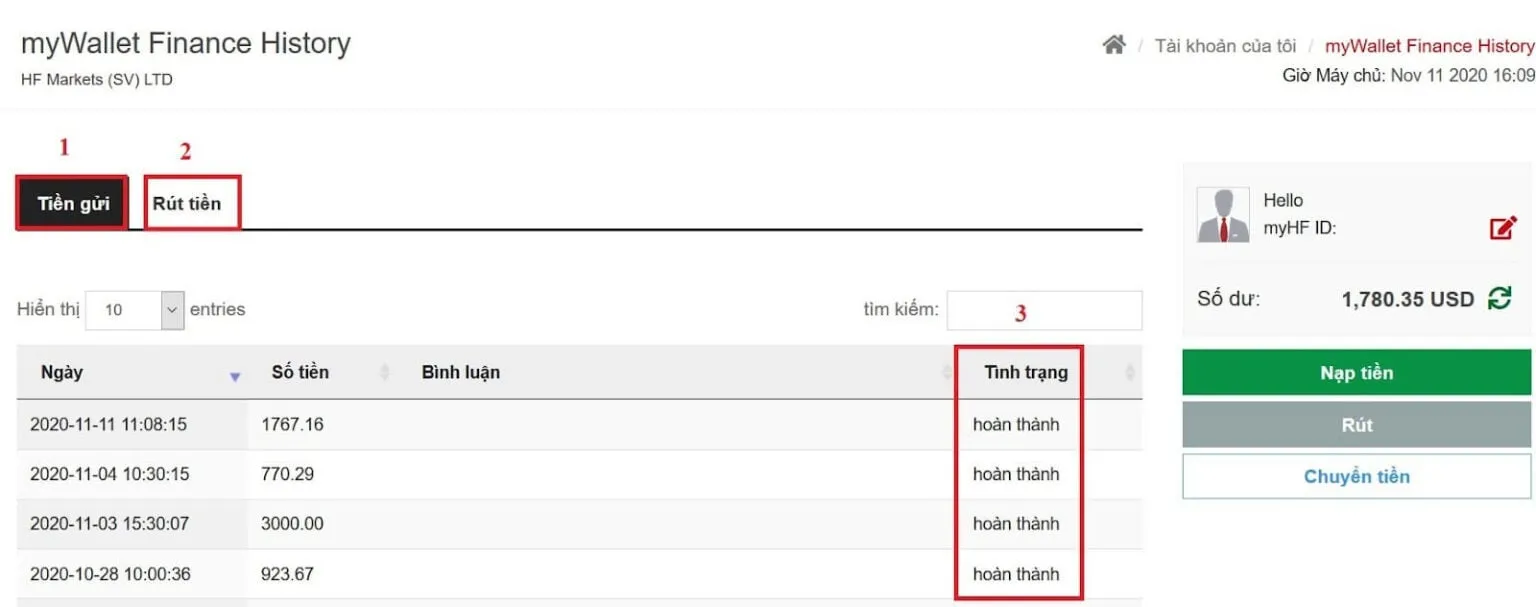
The screenshot shows the Vietnamese interface; the buttons and labels sit in the same places in the English version.
The withdrawal methods
The Withdraw Options page states its minimums in USD, which makes this table more portable than the deposit one — though the set of rows you are shown still depends on your country. Withdrawal requests are submitted in the client area under Fund Withdrawal. From that page on Sep 23, 2026:
| Method | Minimum withdrawal | HFM’s processing time | HFM’s fee |
|---|---|---|---|
| Local bank transfer channels (the set depends on your country) | 13 USD | Up to 2 to 3 business days, depending on the channel | None |
| International wire transfer | 100 USD | 2 to 10 business days, depending on your correspondent bank | None* |
| Visa, Mastercard | 5 USD | 2 to 10 business days, depending on your correspondent bank | None |
| Skrill | 5 USD | Instant | None |
* HFM does not charge for bank wire transactions, but the sending, correspondent and receiving banks may each charge under their own fee schedules.
Read “processing time” the way HFM defines it in the Withdrawal FAQs: it is the time HFM needs to review the request and pass it to the processor of the method you picked. It is not the time the money needs to show up in your bank account or wallet — add the provider’s own clearing time on top.
The 2023 version of this article quoted a 1% intermediary bank fee on bank withdrawals, waived above 5,000 USD of total deposits. The current pages say HFM charges nothing on withdrawals, so that figure no longer applies.
Withdrawal rules to know
- Money goes back where it came from. HFM states plainly that its policy is to return all funds to the original source. Funds have to be withdrawn to the same card used for the deposit before anything can be refunded by another method; only once the amount deposited from that source has been fully refunded can you withdraw the rest by a method of your choice.
- Which card gets the money. The card used for deposits during the last 6 months. Where Visa Direct and Mastercard MoneySend are supported, a withdrawal to the card can exceed the amount originally deposited, so profit can come back to the card too. Either way the payment is processed to the same card and through the same payment processor as the deposit.
- An expired card cannot be used. HFM does not process withdrawals to expired cards; pick another method. If the card was canceled, you need an official letter from your bank confirming the cancelation before you submit the request, and if you have already submitted one to a canceled card, tell HFM through live chat.
- Only the money above your margin is free. HFM’s FAQ puts it as withdrawing “from the funds that are surplus to any margin requirement”. With positions open you will not be able to take out everything the balance shows. The exact levels are in the Client Agreement: section 31.2 of the agreement for HF Markets (SV) Ltd says a withdrawal may not take the margin level of a trading account below 150% on a normal day, or below 300% at the weekend and when the market is moving sharply. We read that section in version 2026-07 on Sep 14, 2026, and version 2026-07 is still the current one, but HFM’s document links were returning an error on Sep 23, 2026, so check the figures in your client area before you rely on them. HFM can also refuse a request while your file is incomplete.
- A bonus changes the picture. If you took the Top-up Bonus, read its terms — a separate document on HFM’s Legal Documentation page — before you withdraw, because withdrawing changes the bonus credit sitting on the account. See HFM account types.
- The processing hours are stated two different ways. The Withdraw Options page says withdrawals are processed 24/7. The general FAQ says a request submitted before 10:00 server time is processed the same business day, between 07:00 and 17:00 server time, and one submitted after 10:00 moves to the next business day. Plan around the stricter of the two, and read “server time” off the clock in your trading platform rather than assuming it matches yours.
- Canceling a request. Ask on live chat. Once the payments team has passed the request to the processor it can no longer be pulled back.
How to withdraw
Step 1: Open the withdrawal section
Sign in to myHF on HFM’s official website, select Withdraw (Fund Withdrawal), pick the method that will receive the money, and start the request.
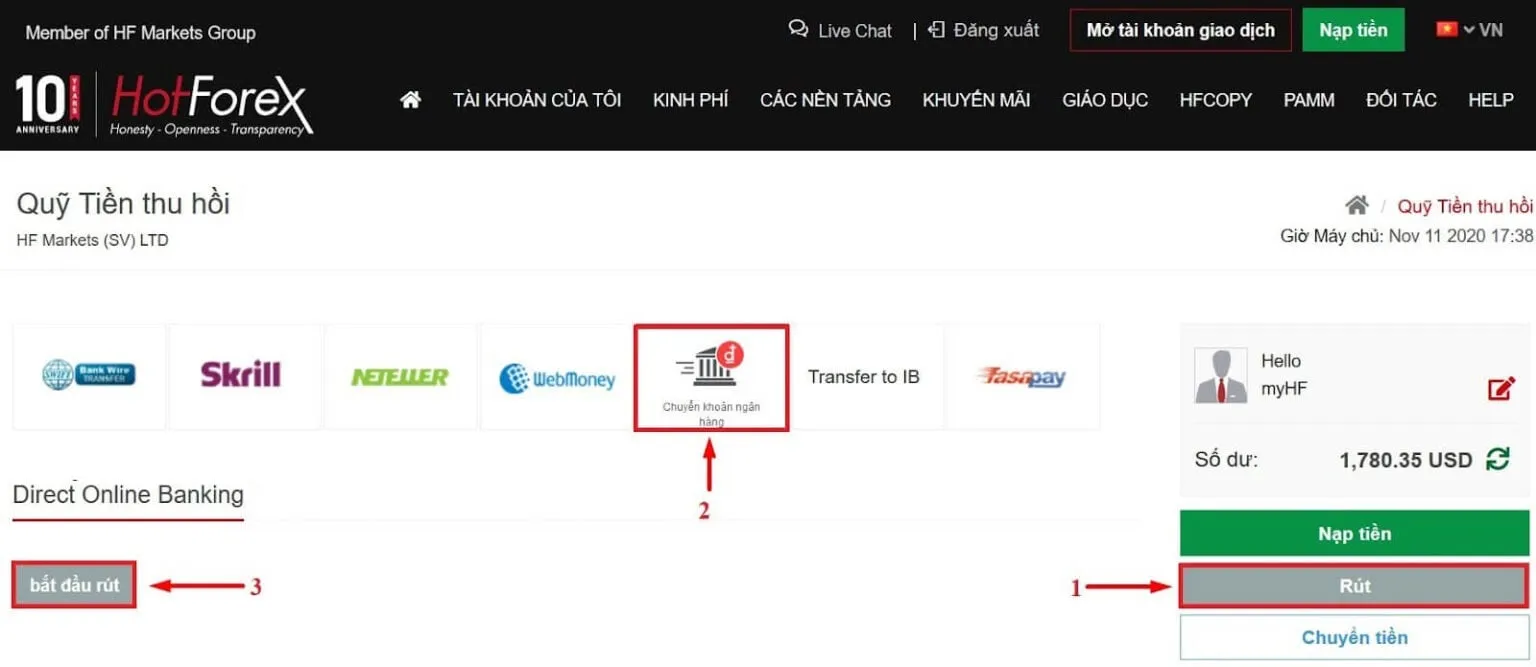
The screenshot shows the Vietnamese interface; the buttons and labels sit in the same places in the English version.
Step 2: Fill in the withdrawal details
The form differs by method, but a bank transfer asks for much the same things everywhere:
- The amount, in the currency of the method, at or above the minimum in the table above.
- Your myHF password.
- Your full name, exactly as it appears on the receiving account and on your HFM file.
- The receiving bank.
- The branch — worth confirming with the bank rather than guessing.
- The account number, or the IBAN and SWIFT/BIC code for an international wire.
- The reason for the withdrawal.
- Your date of birth.
- A last read-through of everything, then send the request.
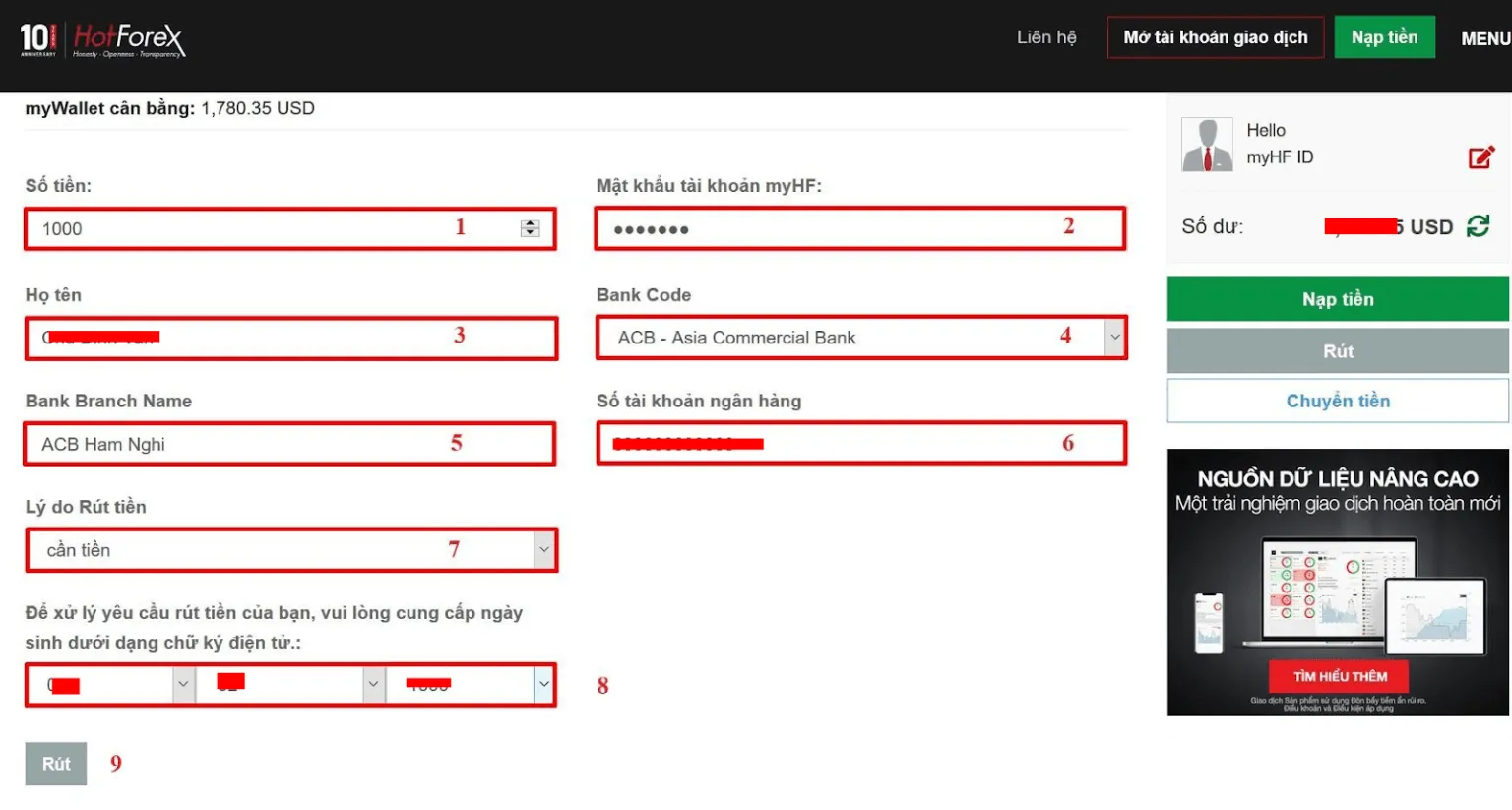
The screenshot shows the Vietnamese interface; the buttons and labels sit in the same places in the English version.
If the method pays out in a currency other than the one your amount is denominated in, the conversion is done at the rate applied when the payment is processed, so the sum that lands is not one you can calculate in advance to the cent.
If the money has not arrived
- Check the status of the request in your myHF wallet’s transaction history.
- Compare the elapsed time with the processing time for your method, plus the time your bank or wallet provider needs to credit the money.
- Contact support with the transaction reference and screenshots. Questions about withdrawals and card refunds go to backoffice@hfm.com; for general support use the live chat on the HFM website, or the support address shown on the Contact us page of the site as it is served to you.
- Keep every email, screenshot and chat transcript.
Be wary of anyone who contacts you privately and offers a “fast withdrawal” or to “unlock your account” if you send more money or share a one-time code. That is a scam, without exception. See how to spot forex scams.
In closing
Deposits at HFM are quick by card and wallet and slow by international wire; withdrawals take anywhere from minutes to ten business days depending on the method and on the banks in between. Before you fund an account properly, deposit a small amount and withdraw part of it, so you learn the real timings and the real amount that lands. And remember the three rules that trip people up most: money goes back to the source it came from, the receiving account has to be in your own name, and a withdrawal cannot take your margin below what the agreement requires.
Read more: the HFM review and Is Forex trading legal in Vietnam?