On this page
Buy Stop and Sell Stop pending orders are very useful order types on the forex market. Once you know how to combine chart analysis with these order types, you can enter at exactly the price you planned without having to sit and watch the screen. In the article below we will not only help you understand what a Buy Stop and a Sell Stop order are, but also give you examples and practical guidance for trading with them.
What is a pending order?
As you know, to trade forex we have to place buy or sell orders. There are 2 ways of entering:
- Way 1: place the order directly (Market Execution)
- Way 2: a pending order
Placing the order directly is the most basic method, and anyone who trades forex knows it. That is, your order is filled immediately at the market price on offer. Whatever price you see the broker quoting is the price you enter at, and it is the one used to work out your profit or loss.
A pending order, by contrast, works just as the name says: you have to wait a while for the order to be filled, once the conditions you set are met. But why wait, and how long do you have to wait? Read on through our examples below to get a clearer picture.
MT4 has 4 types of pending order: Buy Stop, Sell Stop, Buy Limit and Sell Limit. Within this article we will cover the Buy Stop and the Sell Stop. The Buy Limit is covered in the article on what a Buy Limit is.
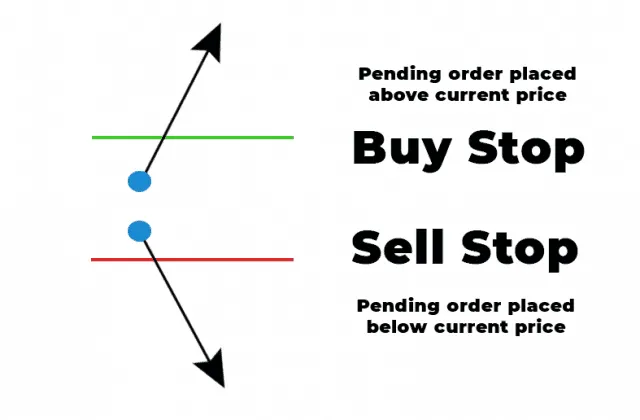
What is a Buy Stop order? Why use one?
The Buy Stop pending order is a very useful tool in a breakout strategy. With it, the price you buy at is usually higher than the current price. That sounds odd, does it not? Who on earth would want to buy higher than the market price?
You have certainly not misread it. You will see why we say so once you look at this example: suppose 2 days have gone by and the major pair EURUSD is still moving sideways in the 1.0030 – 1.0050 price area. No trend has formed, and trading inside such a narrow price area is usually not very appealing.
What is special here, though, is that you believe that as soon as EURUSD can rise and get out of that trading range, an uptrend will burst into life. What do you do in this situation? Are you going to sit in front of the screen 24 hours a day waiting to see when the pair rises so you can click the button to place the order? Of course not.
This is the ideal moment for a Buy Stop order to show its strength. What you need to do is place a Buy Stop at a price of 1.0060. If EURUSD rises and reaches the 1.0060 mark, the broker opens a buy order straight away and you have the chance to ride the move up (if there is one). Because the pending order sits on the broker’s server, the order is still filled even while you are asleep or have the computer switched off. On the other hand, if the pair carries on moving sideways and does not rise to the price where you placed the Buy Stop, the order is not filled and you do not lose any money.
When you place a pending order you should set the stop loss at the same time, for instance below the sideways area (around 1.0025), because price can make a false break and then turn around. One more note: a Buy order is filled at the Ask price, so a Buy Stop can be filled while the Bid price shown on the chart is still a spread’s distance away from the level you set.
Here is an example of a Buy Stop order:
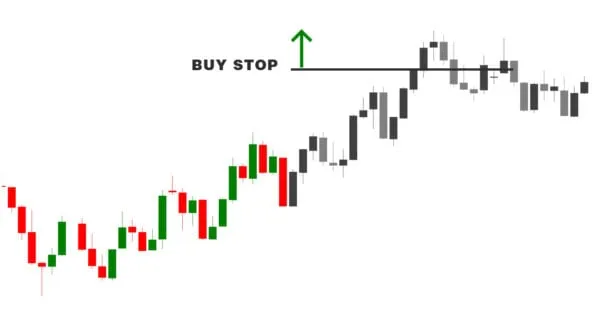
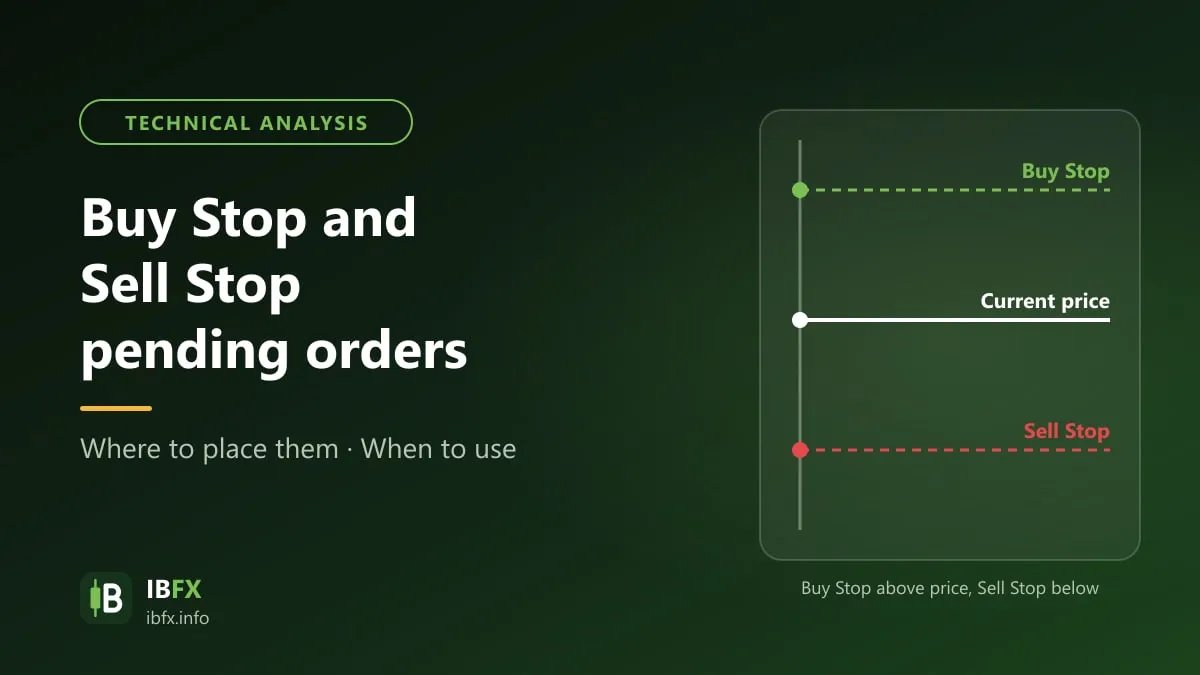
In the illustration above, imagine that the green and red part of the chart is what price has done up to the present moment, and that the gray part is what may happen in the “future”. The Buy Stop order is placed above the current price, and if the market rises and reaches the price set beforehand, the buy order is triggered.
What is a Sell Stop order?
Like the Buy Stop, the Sell Stop pending order is also a very useful tool in a breakout strategy. A Sell Stop is an order set at a price below the current price. Your account automatically enters a sell order if the market falls and reaches a price you have set.
If you have understood what a Buy Stop does, you will find a Sell Stop easy to picture as well. Suppose GBPUSD has been moving in a 1.3010 – 1.3030 trading range for a long time. Entering at those prices is of course a disadvantage, because price is not moving much. That is why you want to wait for GBPUSD to get past the support and resistance levels and cut down through the 1.3000 mark, to confirm that a downtrend has burst into life.
From that analysis you can place a Sell Stop at a price of 1.3000. If GBPUSD falls to 1.3000, the sell order is triggered straight away and you have the chance to catch the trend just as it forms.
On the other hand, if GBP does not fall as predicted, the order cannot be filled and you do not lose anything either.
Here is an example of a Sell Stop order:
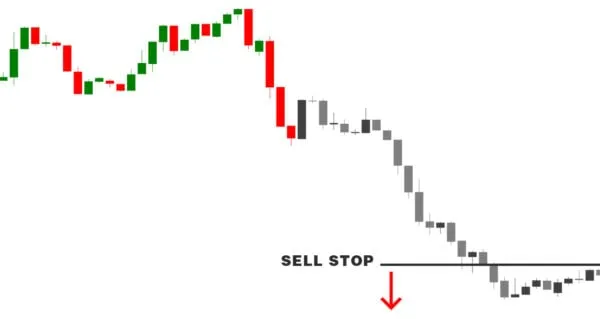
In the illustration above, imagine that the green and red part of the chart is what price has done up to the present moment, and that the gray part is what may happen in the “future”. The Sell Stop order is placed below the current price, and if the market falls and reaches the price we set beforehand, the sell order is triggered.
The advantages of Buy Stop and Sell Stop orders
Here are the advantages of Buy Stop and Sell Stop pending orders over a market order or a Limit order:
- Buy Stop and Sell Stop orders let you “run with the wind”: the order is only filled once price has already moved in the direction you expected (rising, so you buy; falling, so you sell), which keeps you moving with the market.
- Buy Stop and Sell Stop orders can be used to trade the news. When an important release comes out, price can move tens of pips in a very short time, so some traders place a Buy Stop above and a Sell Stop below the current price at the same time (20 pips away, for instance), then cancel the remaining order once one of them is filled. This approach is far riskier than it looks, though: at the time of a release the spread widens and slippage can fill the order further away than the level you set, and price can jerk both ways so that both orders are filled and both lose. Beginners should not use it.
Buy Stop and Sell Stop orders have their own drawbacks as well:
- From what we have said above, you have probably understood that a Buy Stop lets you “buy high and sell higher still to make a profit”, while a Sell Stop lets you “sell low and close the trade lower still to make a profit”. These two orders are very different from the Buy Limit and the Sell Limit, which let you “buy low and sell high”. That is why Buy Stop and Sell Stop orders usually only work when the market makes strong moves.
- False break: price reaches the level where the order sits, the order is filled, and then price turns straight around, so the trade is caught by the stop loss.
- Slippage: when price runs very fast (at the time of a release, for instance), the order can be filled at a worse price than the level you set.
How to place a Buy Stop or a Sell Stop order in MT4
Placing a Buy Stop and a Sell Stop order in MT4 and MT5 is extremely simple. You can follow these steps:
Step 1: once you have analyzed the chart in MT4, press “F9” or click “New Order” on the toolbar to open the order window. In the “Type” box, choose “Pending Order”
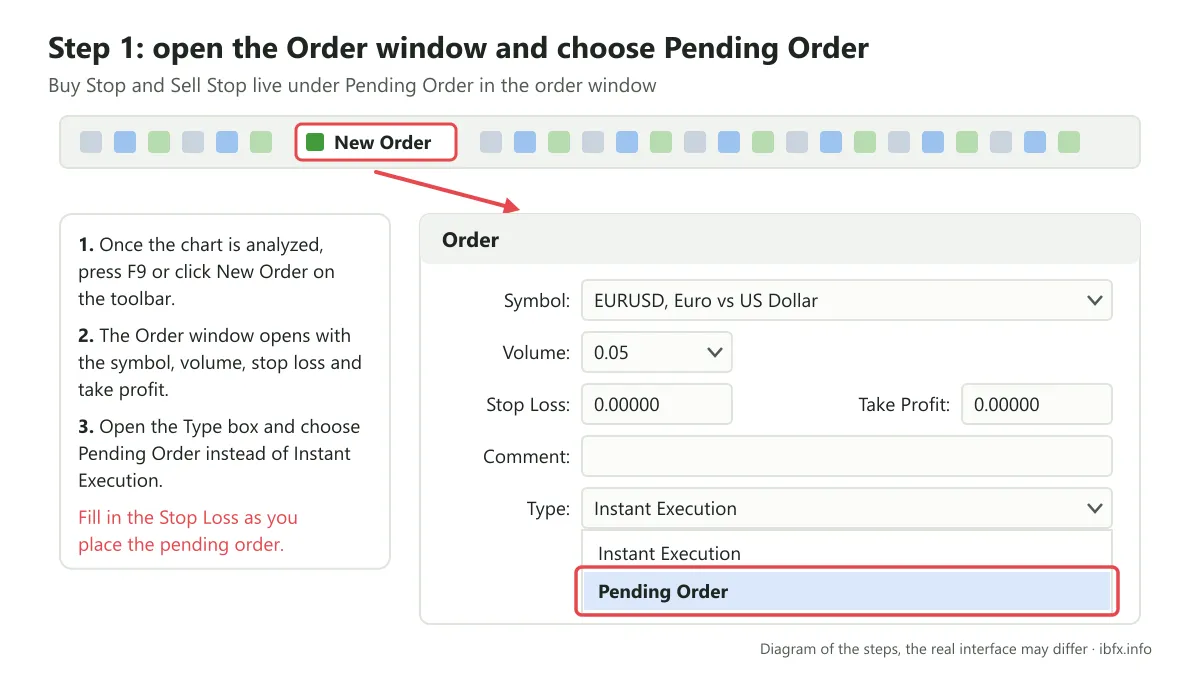
Step 2: once you have chosen “Pending Order”, the window shows one more area where you can pick one of the four pending order types. Here you choose Buy Stop or Sell Stop. Then fill in the trigger price in the “at price” box. Expiry is the expiry time: if the order has still not been filled by then, it is canceled.
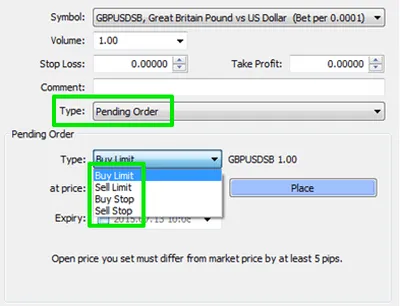
Step 3: check the details of the currency pair, the stop loss, the take profit and the trigger price once again, then click “Place”
How to use Buy Stop and Sell Stop orders
With Buy Stop and Sell Stop orders we can catch the trends that are forming on the market. There are a great many ways of using Buy Stop and Sell Stop orders in detail, and it depends on the forex trading strategy you use. Traders usually use these two orders when they analyze candlestick patterns, price patterns or support and resistance areas.
Here we give an example of one way of using a Buy Stop and Sell Stop trading strategy:
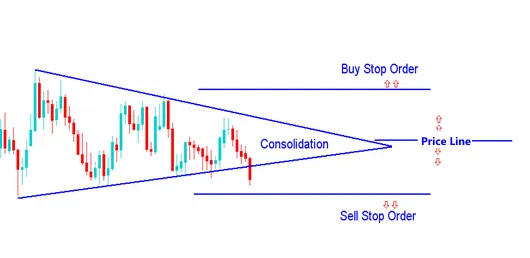
As you can see in the chart above, price is moving inside a Triangle pattern. In theory, if price breaks up through the upper edge of the triangle, the market has a high chance of rising. If price breaks down through the lower edge of the triangle, the market is likely to fall. So, to trade this Triangle pattern, we can place a Buy Stop above the triangle and then a Sell Stop below it. If price rises and reaches the level set, the Buy order is triggered and you have the chance to follow the move up. In the opposite case, if price falls, the Sell order is triggered.
A note: MT4 does not cancel the remaining order automatically once one of them has been filled, so you have to cancel the other one yourself; otherwise price can turn around and fill both orders. Each order must have a stop loss, for instance the Buy Stop with its stop loss below the lower edge of the triangle and the Sell Stop with its stop loss above the upper edge.
Conclusion
The Buy Stop and the Sell Stop are two very useful ways of placing an order in forex trading, and they help you keep up with the latest moves in price. Always remember, though, that however you enter, you still need a sensible stop loss and take profit, and you still have to follow your risk management strategy.