On this page
Like TradingView, ForexFactory is a very large store of information that a trader ought to know how to use. A great many traders, though, treat ForexFactory as nothing but a place to look at the economic calendar, rather than a place to chip away at the knowledge you need if you mean to make a living as a trader. So what is ForexFactory? And how do you get the most out of ForexFactory?
What is ForexFactory?
ForexFactory is a website devoted to finance, and many traders treat it as a “secret weapon” second only to TradingView. It holds just about every tool any trader needs: a forum (Forums), trades (Trades), news (News), an economic calendar (Calendar), the market (Market) and brokers (Brokers).
ForexFactory is so well known that it is not only individual retail traders who go there: plenty of forex brokers turn up to do battle as well. Besides renting banner space, they also post technical analysis pieces as a way of getting the broker’s name in front of other traders. So as you read, keep an eye out for what is really advertising.
What ForexFactory is made of, how many parts does ForexFactory have?
Broadly speaking, ForexFactory has 3 parts that traders care about most: the economic calendar (Calendar), the news (News) and the forum (Forum). In this article we will walk you through those 3 parts in as much detail as we can, so that you can put them to work in your own forex trading.
In practice a great many traders do not think much of news and mostly trade on technical analysis. But the moment news comes out is also the moment the market swings hardest, so whichever method you use, knowing the economic calendar and the particular events, so as to protect your capital and avoid risk (by closing out some trades around those hours, for instance), is worth a look.
One of the things that puts ForexFactory ahead of many other leading forex sites is how freely it lets users customize things. A user can personalize all of the information, or set it up to show exactly what they want, to suit their own needs.
To customize, click the Setting part on the right, or the blue heading with the arrow pointing down at the top of each section. Click there to set up the information the way you want it.
How to read the ForexFactory Calendar (the economic calendar)
This is the most highly rated part of ForexFactory. And although a great many websites have an economic calendar, almost none of them can “get past” ForexFactory. So for many traders, when ForexFactory comes up they think of this section straight away.
To use the economic calendar more comfortably, you should create an account at ForexFactory. It is very simple, not the fuss many other websites make of it.
Signing up for an account at ForexFactory
In fact you do not need an account at all to see everything on ForexFactory. If you want to customize things to your own taste, though, signing up is a must, so that all of your settings are remembered and you do not have to set them up again next time.
In the past a trader had to set the time zone by hand to match the one where they live. Today the site reads the clock on your own device, so the times on ForexFactory show in your local time zone even before you sign in; an account is what makes that choice stick between visits.
To sign up, click “Create Account” at the top right, then fill in a username, a password and an email. Once you are signed up, click “Login” right next to it to sign in.
Once you are signed in, check whether the clock showing on ForexFactory matches the time zone where you live, by looking at the clock right next to your username.
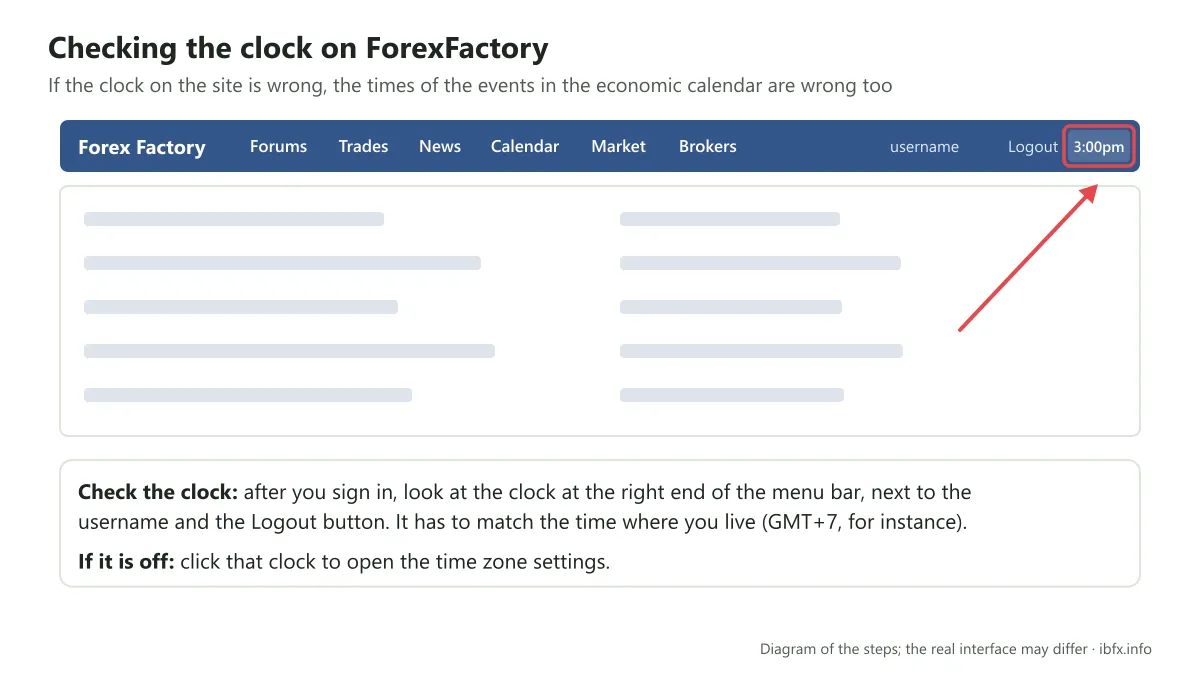
If it is not right, click that clock, set it again, and choose “save setting” — that is all.
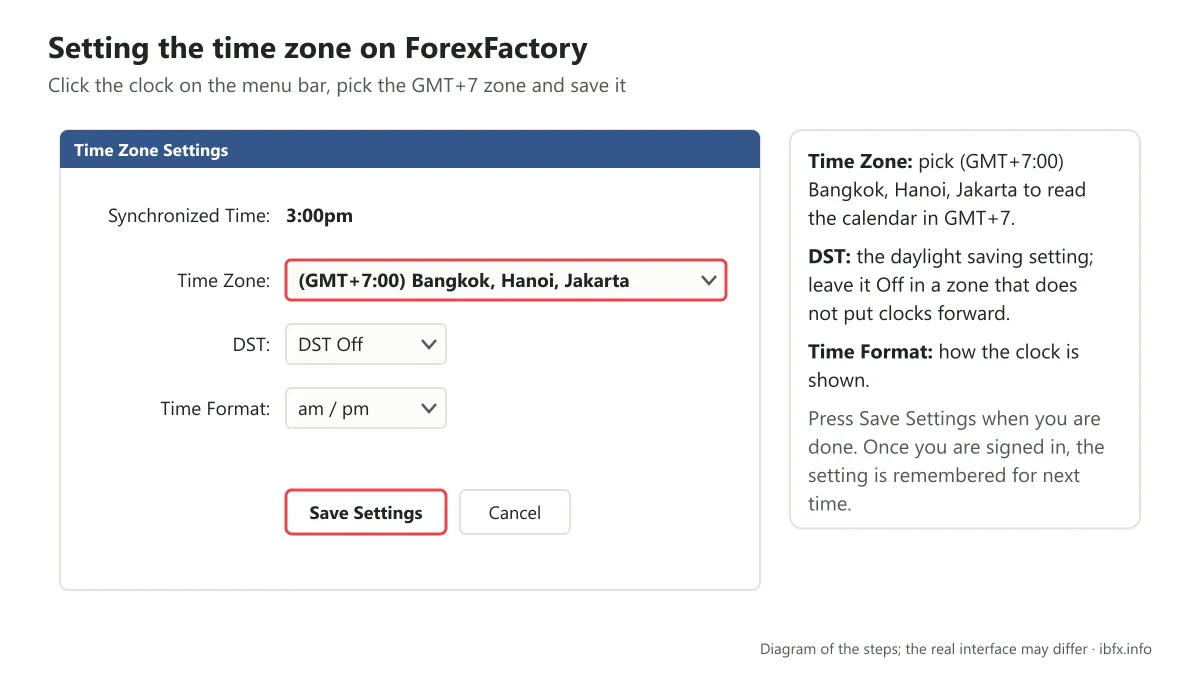
Setting the time zone matters a great deal, so that you can read the economic calendar in the right time zone (GMT+7, for instance). If the time zone is wrong, it is very easy to get the hour of an upcoming economic event wrong.
Once that is done, click the “Calendar” line above and all the economic calendar information comes up, like this:
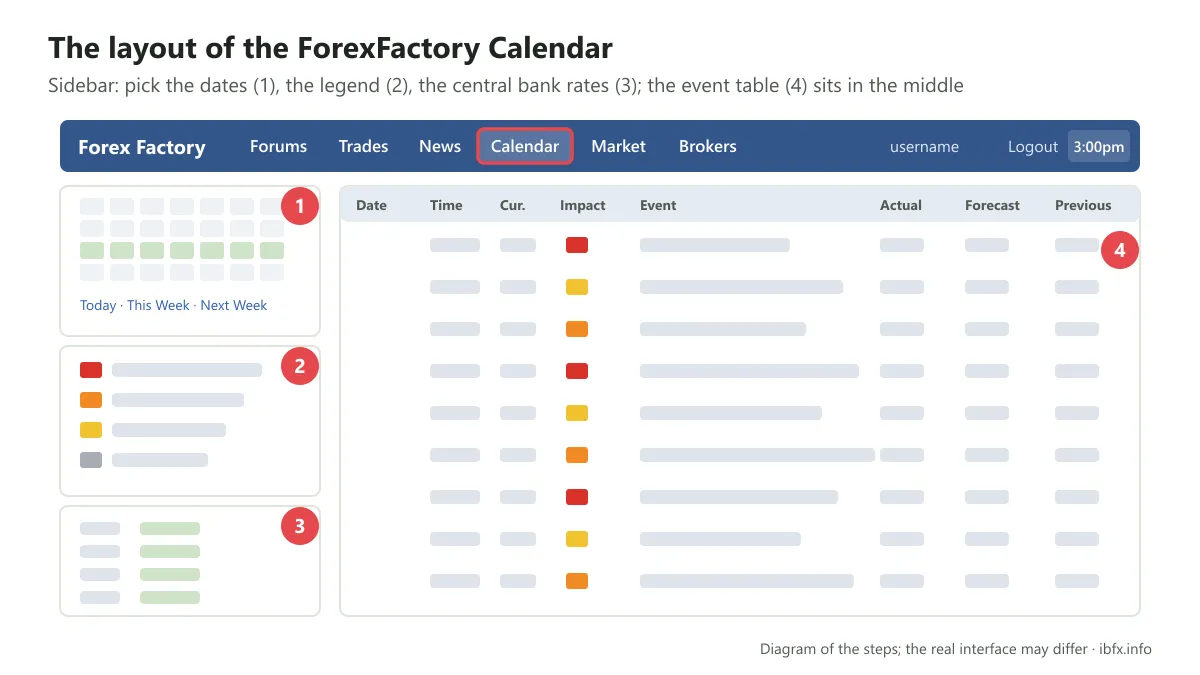
The ForexFactory Calendar is split into 2 main parts: the Sidebar, and the event table in the middle, which carries every event that has happened, is happening and is due to happen.
The Sidebar of the ForexFactory Calendar
There are 3 smaller parts here, which ForexFactory spreads from top to bottom and which we have numbered as in the picture above:
Part 1: the table of dates the events fall on. ForexFactory defaults to the week, but right below it the site also breaks it down so you can look at the day (Today); yesterday (Yesterday); last week (Last Week); last month (Last Month); tomorrow (Tomorrow); the next week (Next Week); the next month (Next Month); this week (This Week), which is also the default when you look at the economic calendar on ForexFactory; this month (This Month) and last of all what is about to happen (Up Next). Click whichever one you want to look at to see it in more detail.
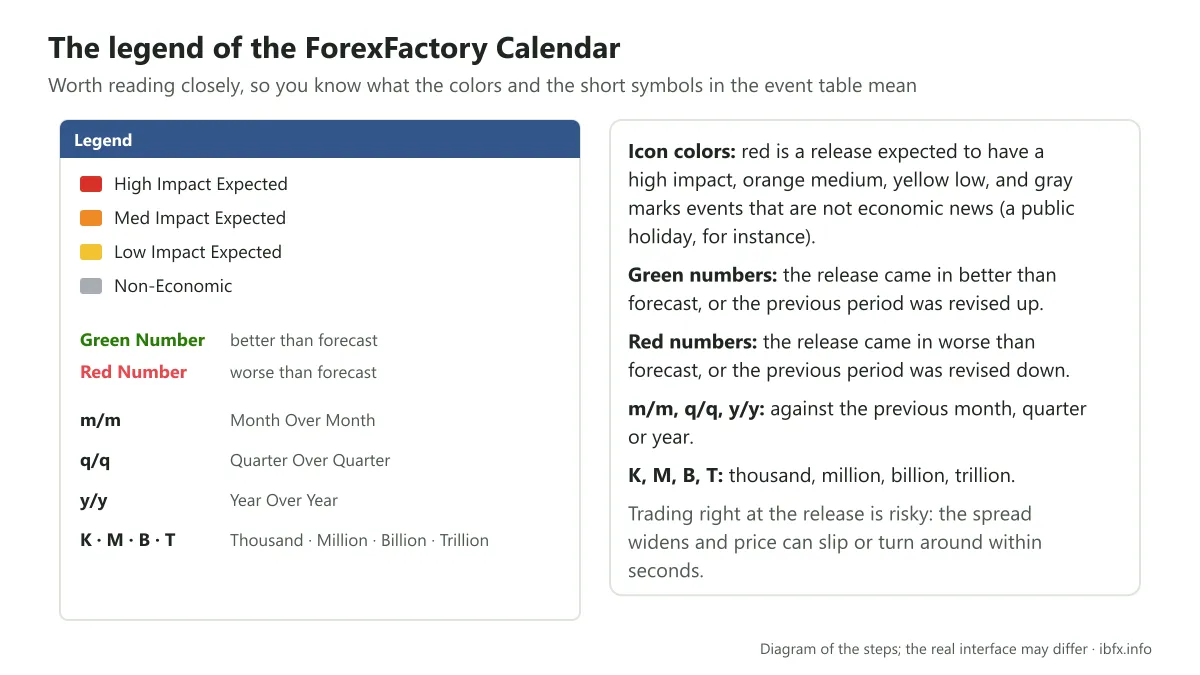
Part 2: the legend ForexFactory gives for some of the abbreviations and the colors shown in the event table. You should read this part closely, because ForexFactory sets out what each symbol or color means, for instance: green is used for a figure released better than the expected figure. Red is a figure that came out worse than the expected number. We will go into this part in detail further down. Note: trading right at the release is very risky, because the spread widens and price can slip or turn around within seconds.
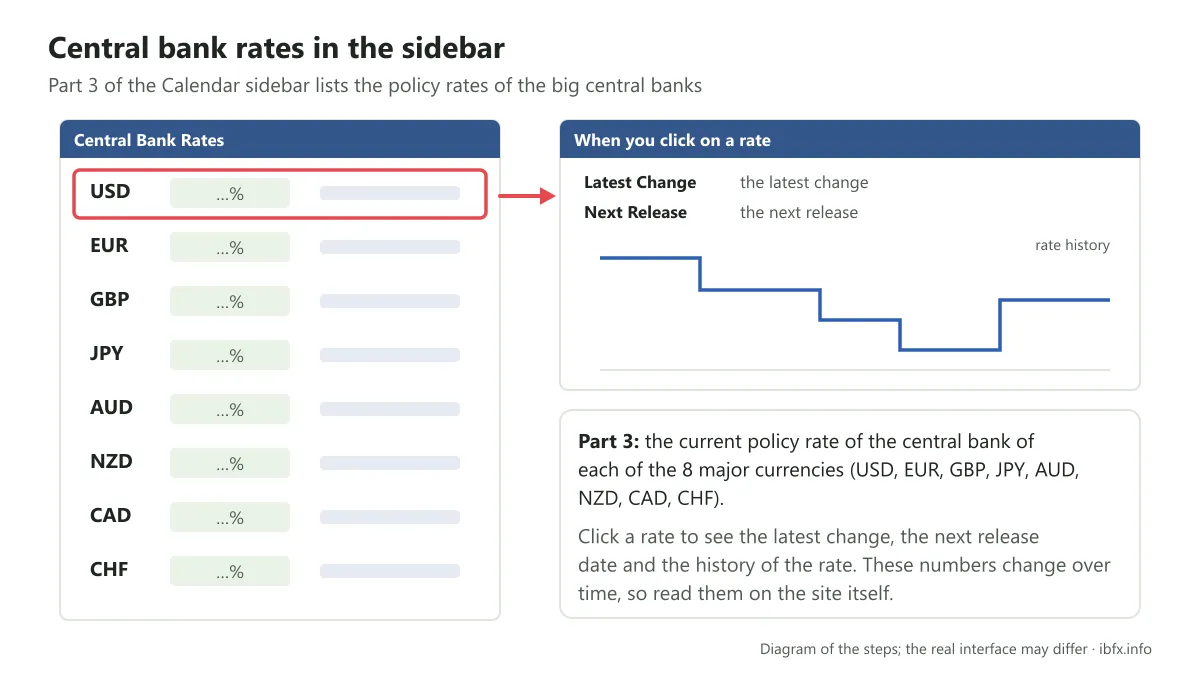
Part 3: the current policy rate of the central banks of the major currencies (USD, EUR, GBP, JPY, AUD, NZD, CAD, CHF). You can click each rate to see more information and the history of the changes over the periods.
Now we come to the most important information on ForexFactory: the calendar sitting right in the middle of the site.
The event calendar ForexFactory provides
Here, every important economic event that happens is shown in full. If you have set the time to your own zone the way we showed above, the times shown will match the time zone where you live. Sign in to ForexFactory so your settings are remembered for next time, and always check the time zone again before you read the calendar.
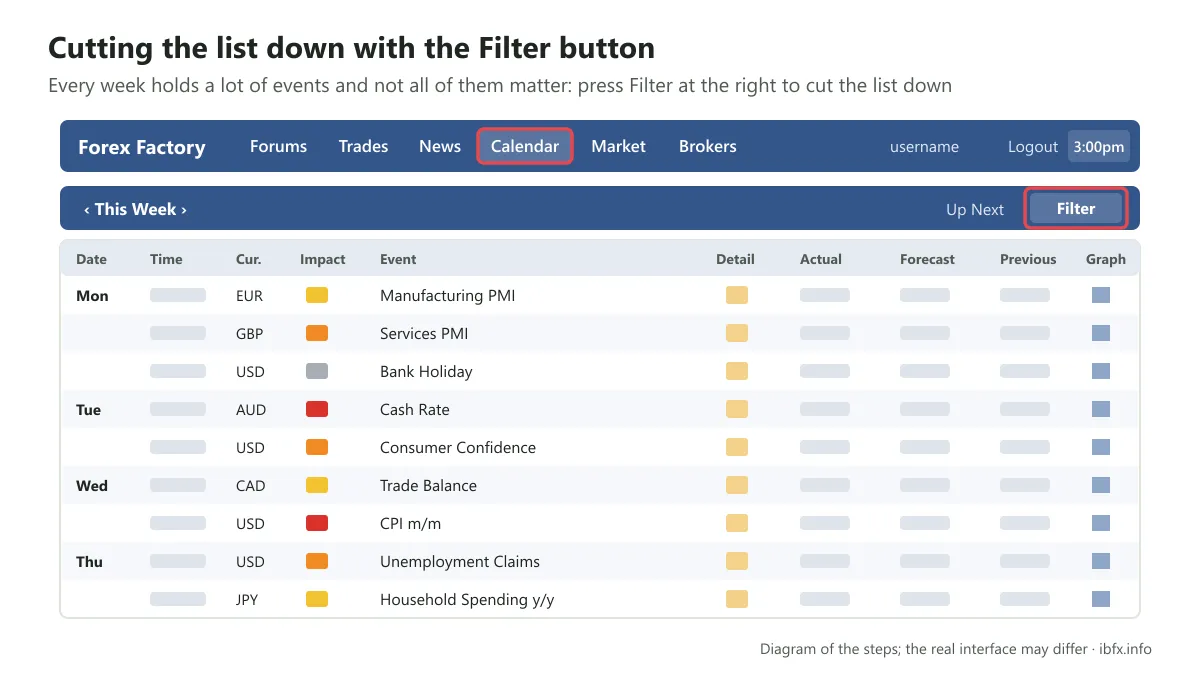
As you can see above, a great many events happen in one day, and not all of them are ones you need to care about or that serve your day-to-day forex trading. For that reason you should strip out the information you do not need, using the filter ForexFactory provides: click the word “Filter” above to bring up a filter with 3 basic settings, namely:
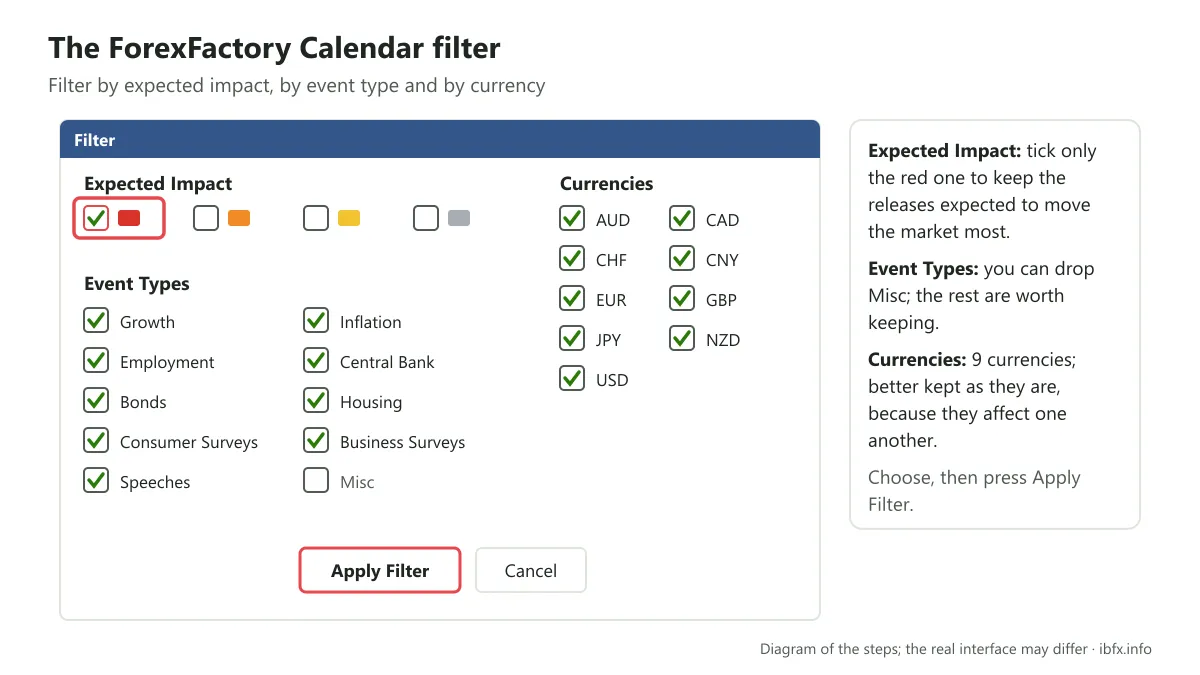
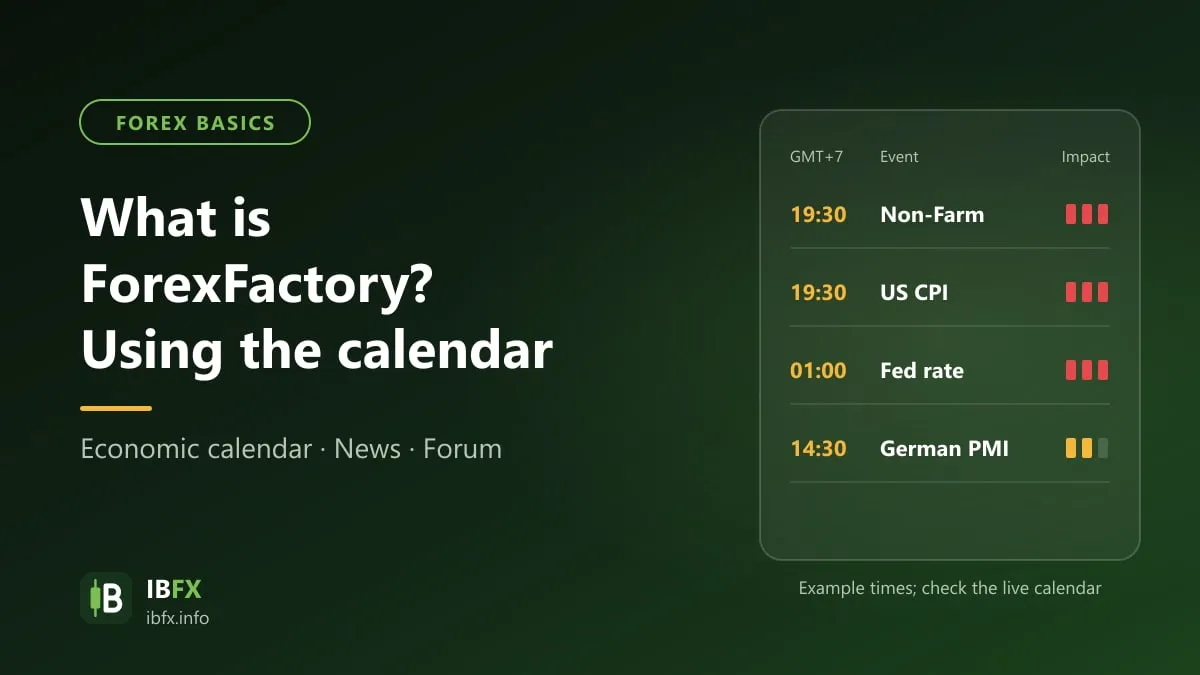
Expected Impact — this is where ForexFactory rates how far that piece of news will affect the forex market, using 3 colors: red, orange and yellow. The gray you see in the picture is for events that have nothing to do with the economy, such as the public holiday schedule of some country.
Of the other three colors, the one with the biggest and most important effect is red. So you can customize this part by choosing to show only the red news, and the rest of the colors will be hidden, since there is no need for them to appear.
Currencies: the place that holds all the events tied to the 9 currencies ForexFactory lists here. If there is one currency you care about most you can leave it in and drop the rest. We would leave it as it is, though, because these currencies are all connected and affect one another.
Event Types: the kinds of important economic event that affect a currency pair. You can drop things like Misc; the rest are all worth keeping. That is because ForexFactory already sorts events by color above. So you only need to drop the 3 colors you do not need, as above, and leave the 2 parts below as they are. Once that is done, just click “Apply Filter” and this is the result you get:
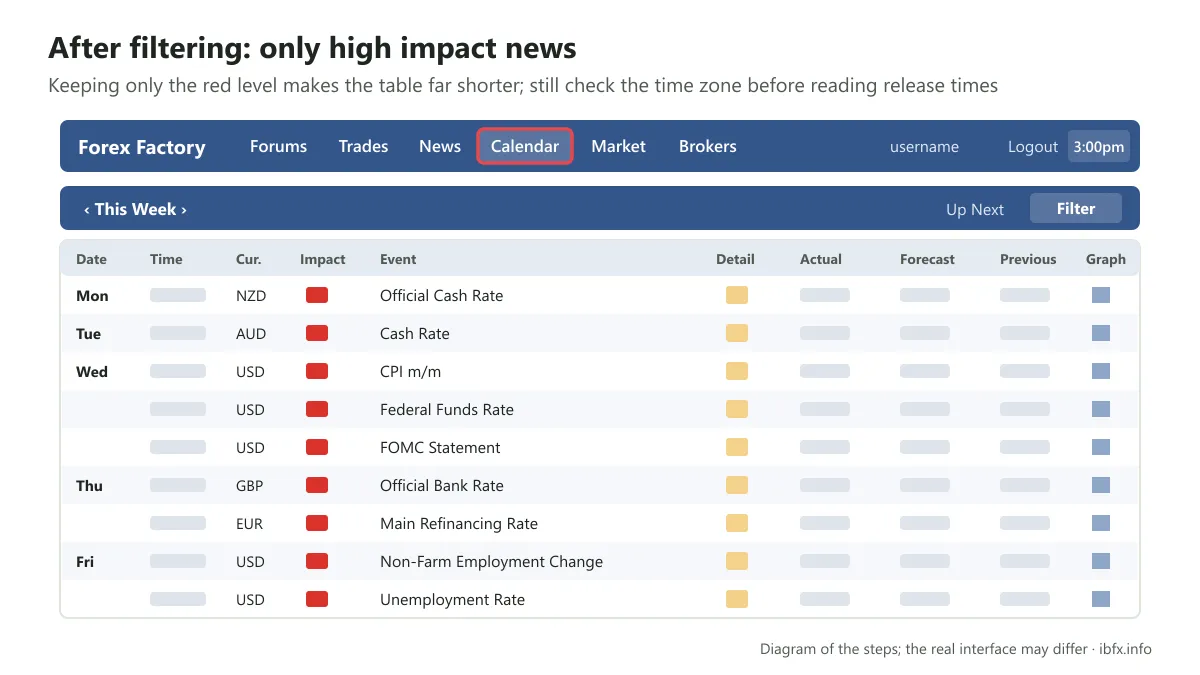
So now only the most important red information shows. Next, we will walk you through some of the most basic information for reading these events for the purposes of forex trading.
How to read the information and the figures of one event in the ForexFactory Calendar
A great many traders come to forex sideways, from some other trade, so when they look at the table above they can hardly judge how much that news is worth to the currency pairs. That is why ForexFactory provides the shortest possible notes, so that everyone can understand what each event means.
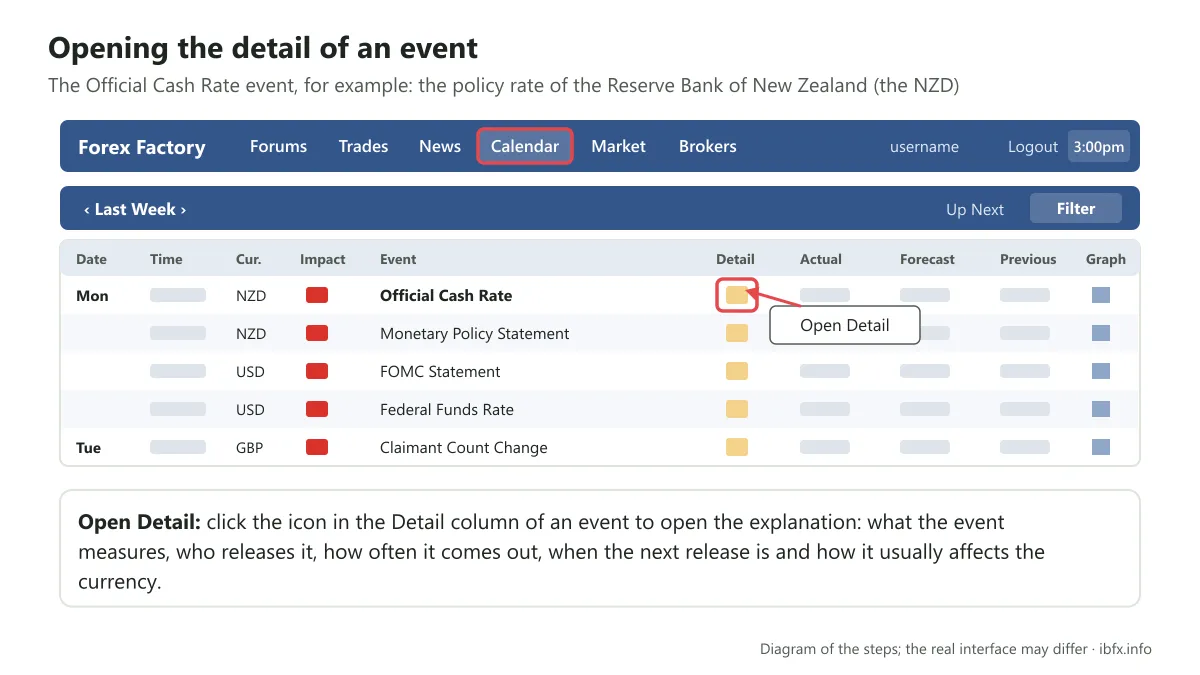
Just click the icon in the Detail column — here we tried it on the event tied to the “Official Cash Rate”, the policy rate of the Reserve Bank of New Zealand (the NZD) — and the information opens up as in the picture below:
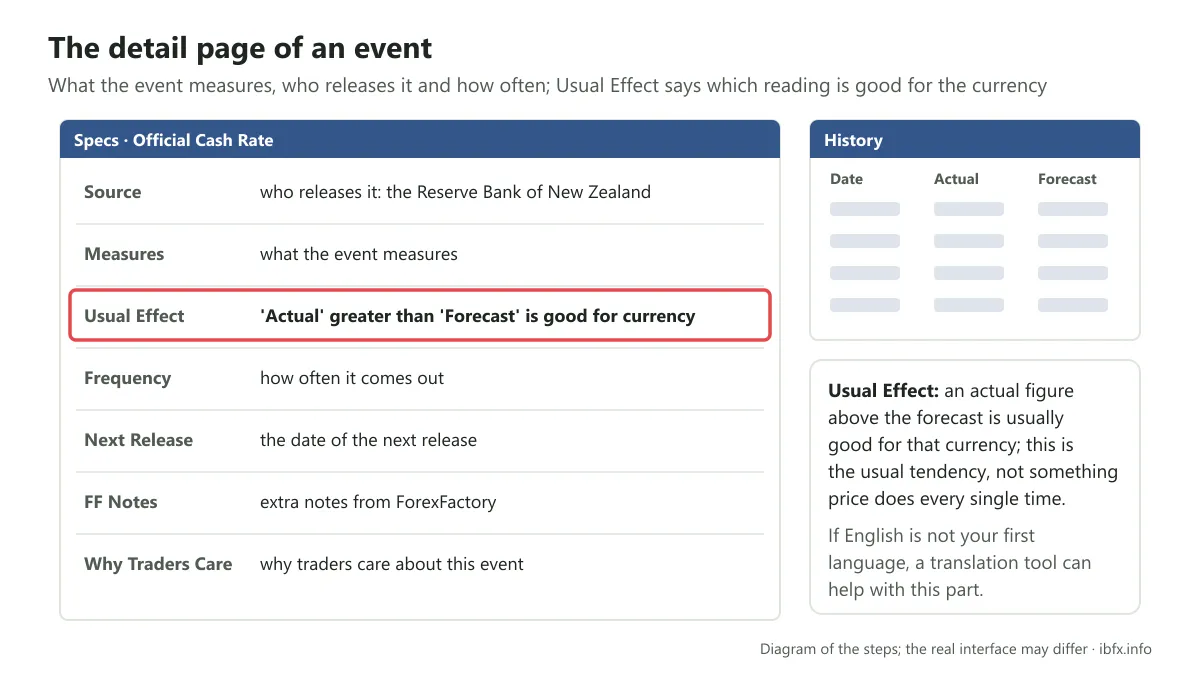
ForexFactory provides a great deal of basic information to help a trader understand the Official Cash Rate event: notes from ForexFactory itself, where and how this rate is used, how many times a year it happens, which month the next one falls in… If English is not your first language, you can use a translation tool to follow all of that.
The most important events to remember when you read the ForexFactory economic calendar
- The scheduled meetings of the Federal Open Market Committee (FOMC), the monetary policy body inside the Fed.
- Non-Farm Payrolls (NFP): usually released on the first Friday of the month, at 12:30 UTC (summer) or 13:30 UTC (winter), which is 7:30pm or 8:30pm GMT+7. This is one of the releases that moves price hardest, widens the spread and causes slippage. New traders should avoid opening a trade right before it and in the few minutes after it comes out.
- The unemployment rate (Unemployment rates), released at the same moment as the Non-Farm figure
- Gross domestic product (GDP): usually released by quarter, with a preliminary reading and the revisions (Final GDP) after it
- The consumer price index (CPI), the measure of inflation central banks watch closely
- Monetary policy statements or speeches about monetary policy (Monetary Policy), and above all the speeches of the chair of the Fed or of the heads of the other big central banks.
- Central bank rate decisions (the Official Bank Rate of the Bank of England, for instance)
Now for the important part: how news like that affects a currency, and how you read one release.
How to read one event in the ForexFactory economic calendar
To read one economic event you need to care about these 3 things:
- Previous: the figure released last time
- Forecast: the figure the analysts expect
- Actual: the real figure just released
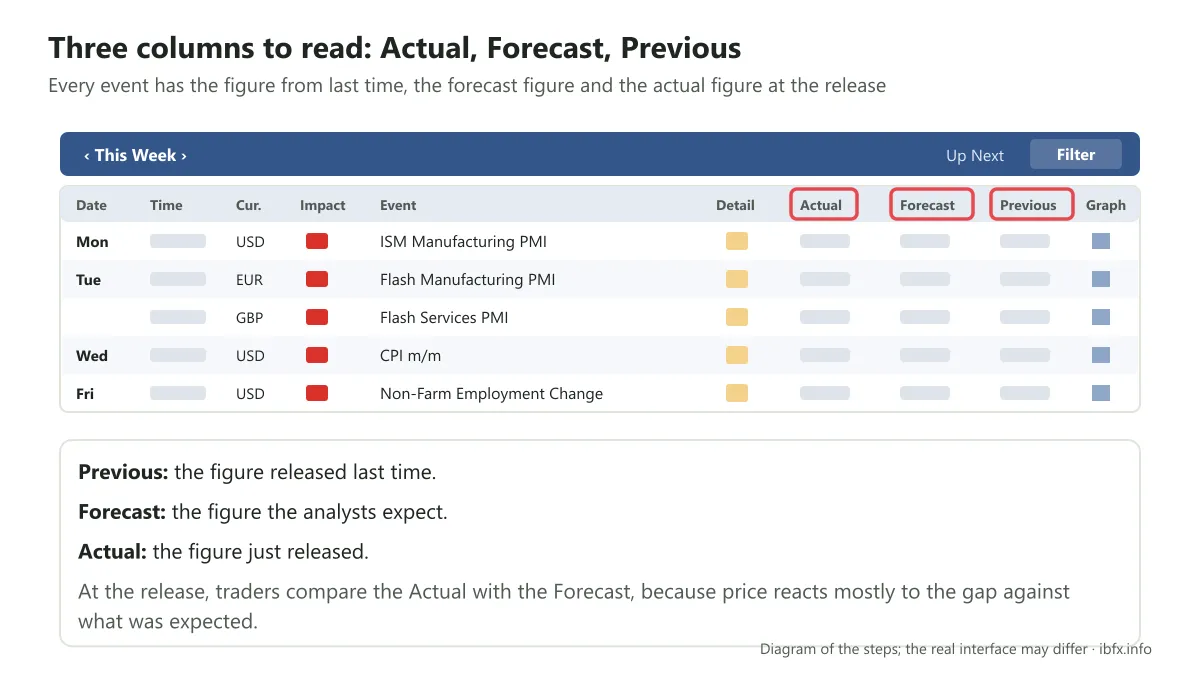
Usually, at the moment of the release, a trader compares the actual figure (actual) against the forecast figure (forecast), because price reacts mostly to the gap against what was expected.
Since the USD is the currency that affects almost every one of these events, we will use pairs that hold the USD, say XXX/USD (XXX being some currency), as the example, so it is easier for you to follow.
- If the actual figure is better than forecast for the USD, the USD usually rises; because the USD is quoted second, the XXX/USD rate falls.
- If the actual figure is worse than forecast, so that the USD falls, that means the XXX/USD exchange rate rises.
A worked example so you understand this better.
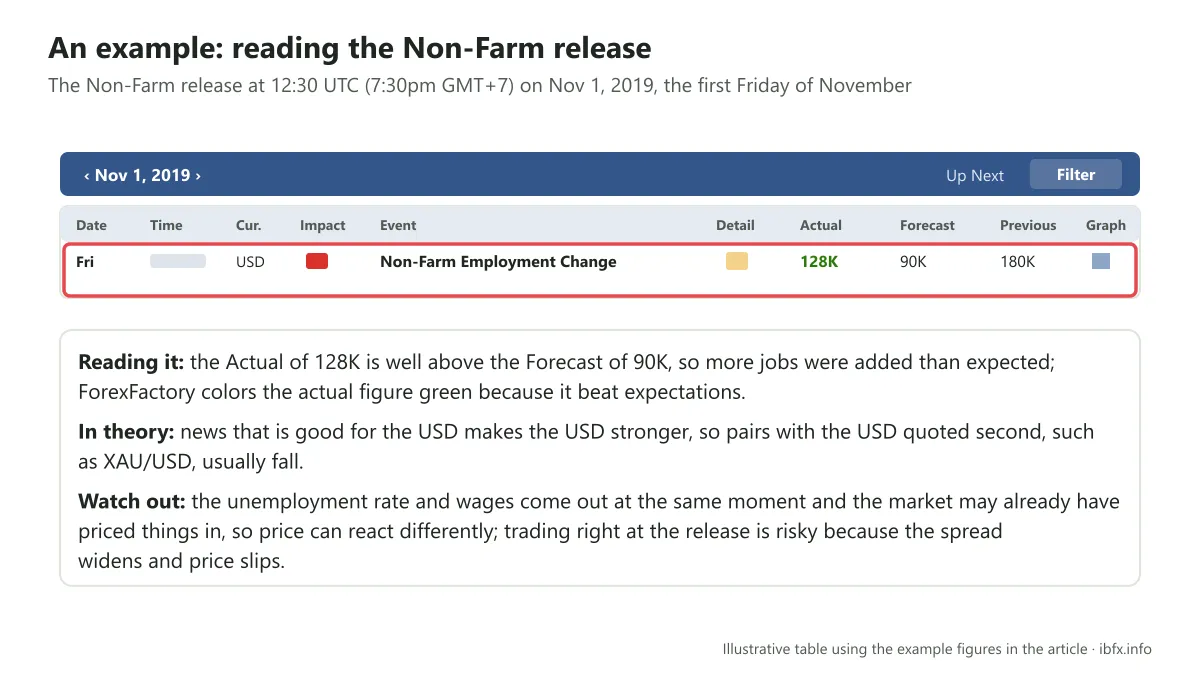
Nov 1, 2019 was the first Friday of November, so the Non-Farm event took place at 12:30 UTC (7:30pm GMT+7). As you can see, the actual figure (128k) was a great deal higher than the forecast figure (90k). That pushed the USD up, and when the USD rises it pushes gold, or XAU/USD, down. In this example the gold price fell hard on the very M30 candle of the release.
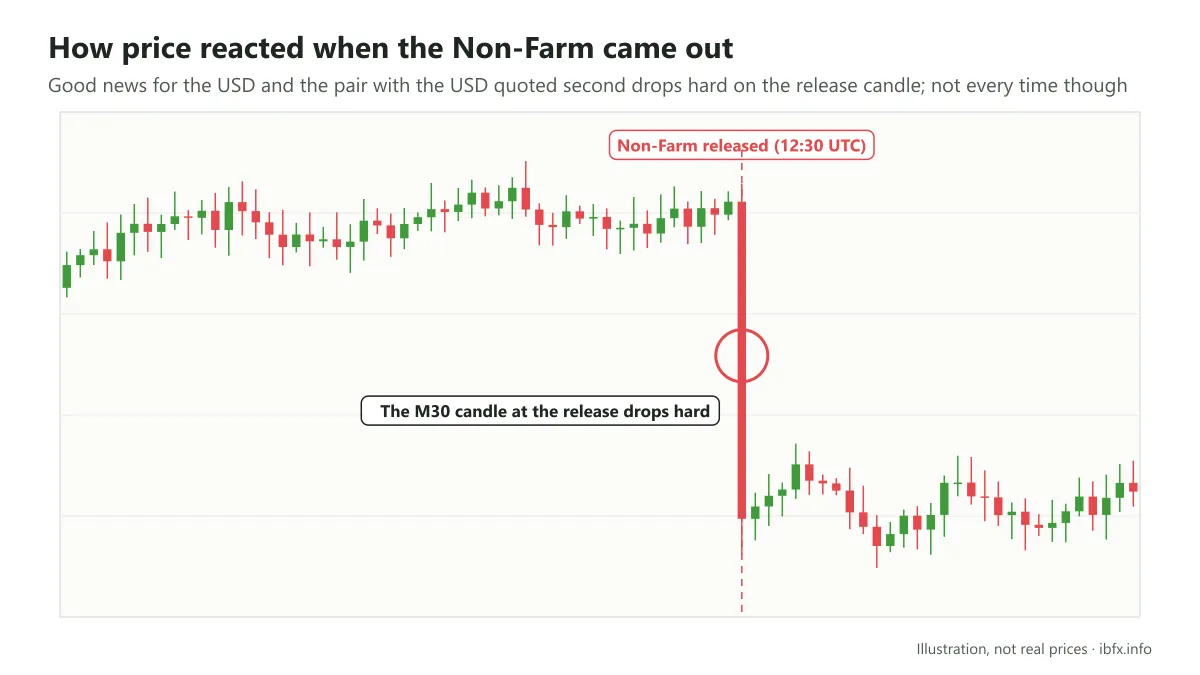
Of course this is only the theory and it does not hold in every case: price can react the other way because of the other figures released at the same moment (the unemployment rate, wages) or because the market has already “priced it in”. You can use this to understand why an exchange rate swings so hard, but you should not treat it as a sure signal to enter.
How to read the news on ForexFactory (ForexFactory News)
Besides the economic calendar, the news on ForexFactory is updated every day and very quickly; it is usually gathered from the big news agencies and financial sites (every item cites its source). You should get into the habit of reading the news and checking it against the original sources, such as Bloomberg, Reuters or the official site of the central bank.
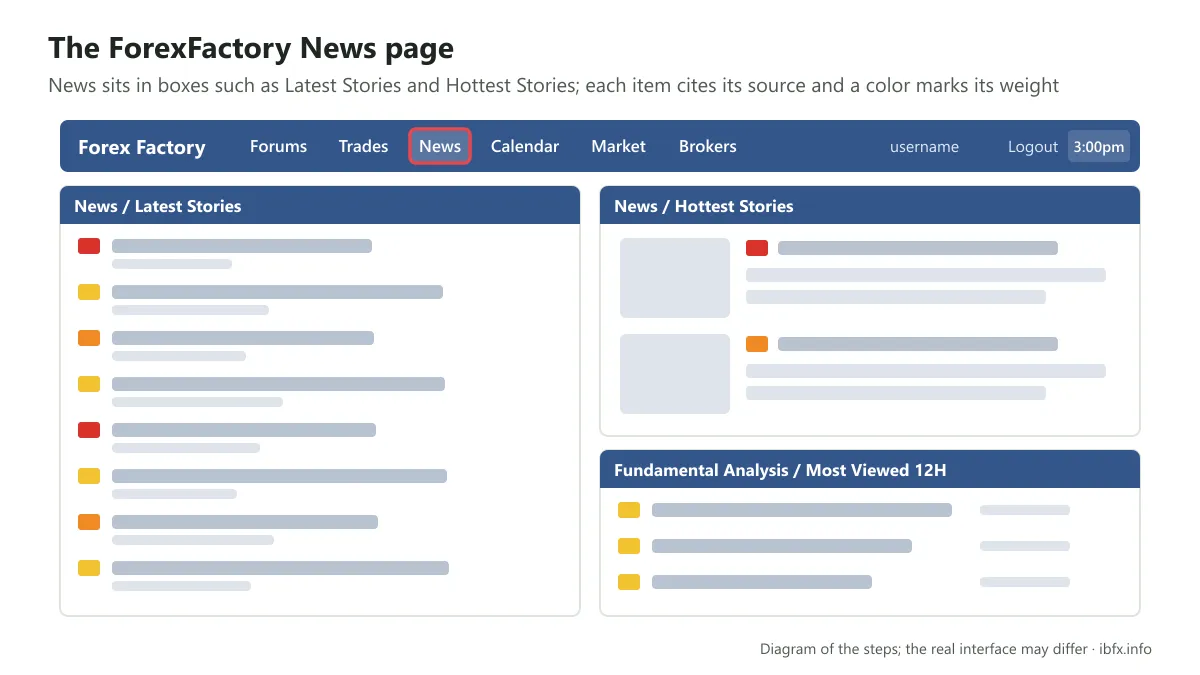
To read the news you click the word News, and there will be a great many different sections arranged in boxes, such as:
- News / Latest Stories: the newest news
- News / Hottest Stories: the hottest news, the ones running hardest
- Fundamental Analysis / Most Viewed 12H: the fundamental analysis pieces
- News / Latest Liked: the news that has just picked up more likes
- Entertainment News / Latest Stories: the newest lighter news
- Educational News / Latest Story: the newest news to do with trading
- Breaking News / Most Viewed 12H: the “hot off the press” items read most in the last 12 hours
- Technical Analysis / Latest Stories: technical analysis
- Forex Industry News / Latest Story: news to do with the forex industry
So you can pick whichever part you like best to read. These news items are usually repeated, and in each part ForexFactory also marks how weighty they are, so a trader can take it in at a glance: red items are very important news that can affect the forex market, while yellow and orange items are usually gentler and not as frightening as the red ones.
The news ForexFactory marks red is usually news to do with interest rates, speeches by a central bank chair or by the leaders of the big economies. When you see items like that you should pay attention, because they can affect the market a great deal at the moment of the release.
On top of that, as we said, ForexFactory lets you customize all of this information: just click the news box you want to customize, as below, and a panel comes up:
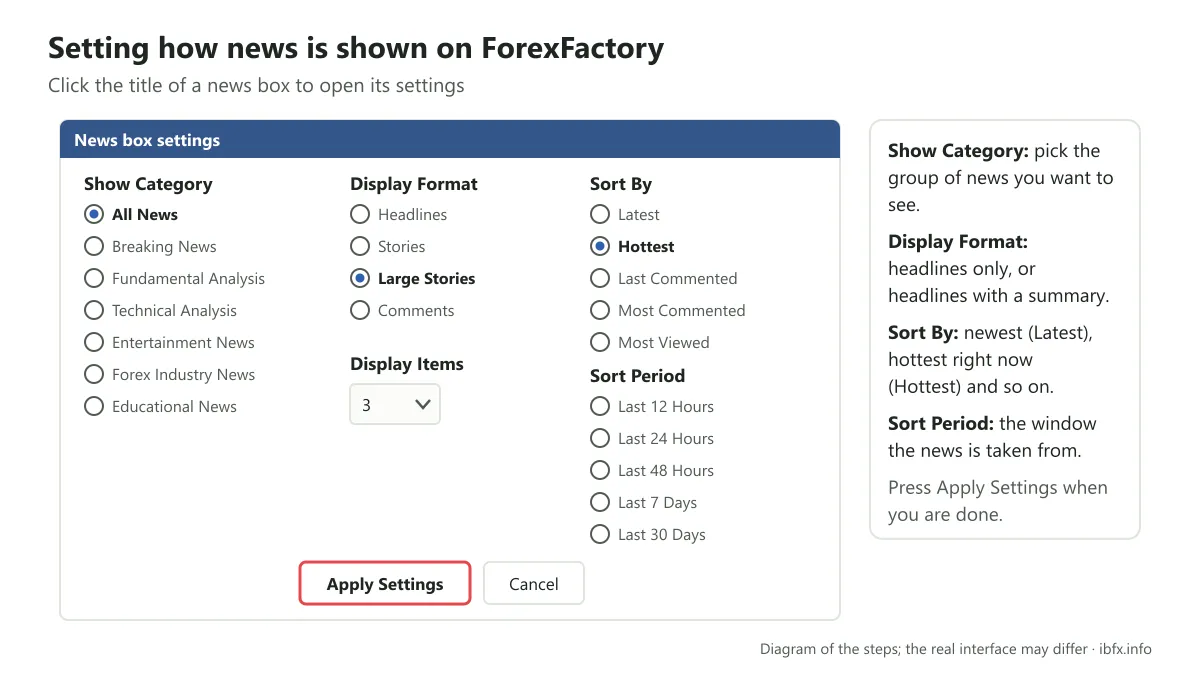
Under Show Category a trader customizes it however they like; leave it on the ForexFactory default and all the most important news shows up there. Or under Sort by, a trader can choose the newest news (Latest), the hottest news right now (Hottest)… In general, give these a try, get a feel for them and work your way into using them as you like.
The Forums section on ForexFactory
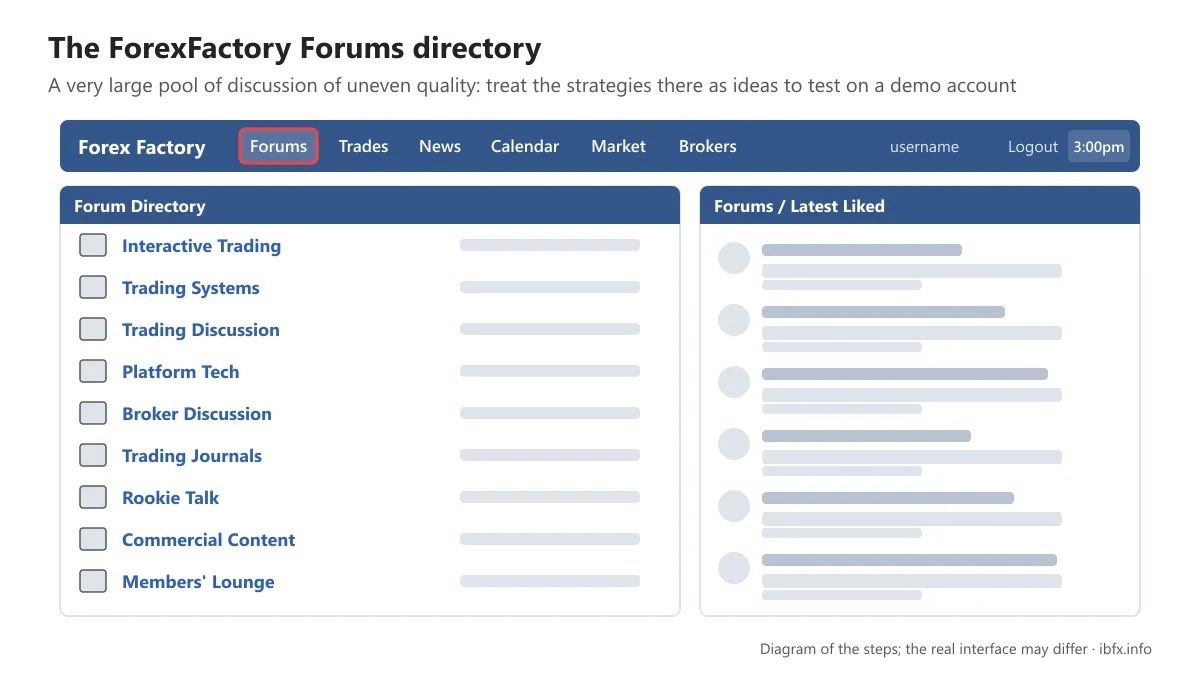
This is also one of the best loved sections, thanks to the technical analysis and fundamental analysis people share there, along with plenty of other genuinely useful information. It is a very large pool of discussion, but the quality is uneven: a lot of strategies and systems are shared with handsome results that were never checked, and there is disguised advertising too. Treat the threads here as ideas to test for yourself on a demo account, not as a formula for making money.
Beyond all this, ForexFactory has a great many other features you can use as you need them. ForexFactory is in English only, so you need English or a translation tool to follow the content.