On this page
A stop loss and a take profit are 2 basic ideas that every trader who trades forex has to know. They are the 2 order types used to fix the profit or the loss of a buy or sell trade on the market. Although they matter a great deal, setting a stop loss or a take profit is not compulsory when you place a trade, so a great many traders make light of these 2 order types and do not use them, which leaves them losing money when the market goes the other way from what they expected.
We have already published articles on the stop loss, so this time we will carry on and share what there is to know about the take profit, why this order type matters and how to use it.

What is a take profit?
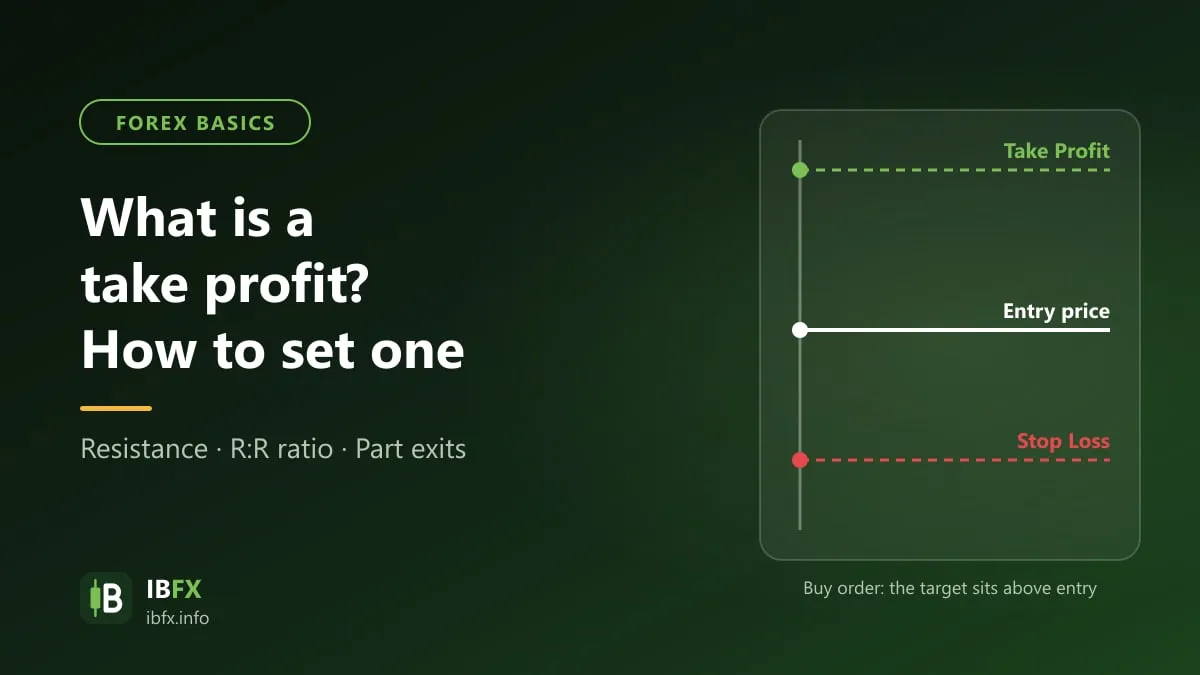
Both the stop loss and the take profit are order types that go along with the main trade (a Buy or a Sell). The stop loss marks the point where the loss stops (a price decided in advance), which means that if the market goes the other way from what you expected and reaches that price, the main trade closes automatically and the trader takes a loss. The take profit, on the other hand, is used to mark the point where the profit is taken: when the market goes the way you expected and reaches that point, the main trade closes automatically and the trader has a profit.
In forex trading software, the take profit is sometimes written TP or T/P.
What a take profit order is for
Professional traders do not treat the take profit or the stop loss as order types at all, but as a “trading rule”, and they always keep the discipline of treating them as 2 steps that any trade of theirs must include.
New traders, and people without much experience, by contrast show no interest at all in these 2 tools; they make light of them and seem to forget them whenever they place a trade. If you are one of them, read this part carefully, and you will certainly change your mind.
First, a take profit manages the trade for you automatically.
That is, you do not have to sit at the computer for hours on end waiting for the profit to reach what you expected before you close the trade: the take profit closes the trade for you automatically if the trade reaches the profit you set in advance. Or the other way around, it still closes the trade automatically, but to fix the loss when the market goes against your prediction, through the stop loss you set in advance.
Second, a take profit keeps the trader clear of the psychological factors
Suppose you do not set a take profit and the market moves in the trend you expected. At this point the trade has the profit you wanted, but are you sure you have seen enough of that profit? Most of us are in the state of mind of “the market is moving in the right trend, just wait a bit longer, it will surely go higher / lower still”, and so you carry on waiting; but life is not a dream. The moment it reaches the profit you expected, it turns straight around. What now? “Oh, what a shame, if only I had closed the trade back then”, and then that state of regret makes us hope for a miracle once again, and what is the result? What was a small profit has now become a large loss. This state of mind is hardly rare, but happens very often, especially to new traders.
Third, a take profit is a tool for managing risk and managing your capital
On any trade, we know more or less how much profit that trade might bring, or how much we would lose if the risk played out, within the limits of the strategy we use. And of course that profit or that loss can be fixed by the take profit and the stop loss. With these 2 tools you will know roughly how much money will come off or be added to your account after a trade (unless there is slippage when the market moves very hard), and you can keep your capital fully under control. From there you can plan other trades better.
Note: the take profit is especially necessary for short-term traders such as scalpers and day traders, and the tool plays all 3 of its parts on these short-term positions. For long-term traders such as swing traders or position traders, the take profit is sometimes skipped, because it can cost them part of the profit when a trend runs a long way; they usually replace it by moving the stop loss along with the trend. Even so, the stop loss must always be there.
How to set a take profit in the MT4 software
There are 2 ways you can set a take profit or a stop loss for a particular trade: setting the take profit for a new position, and setting the take profit for a position that is already open, a trade already running on the market.
Read: What is MT4? A detailed guide to using MetaTrader 4
Setting a take profit for a new trade
With any trading strategy you can work out where the profit is to be taken, and you should set the take profit right from the start, because the market moves continuously and sometimes price runs beyond control before you can adjust the take profit.
To set a take profit for a new trade, you place the order as usual (not by using the one-click function)
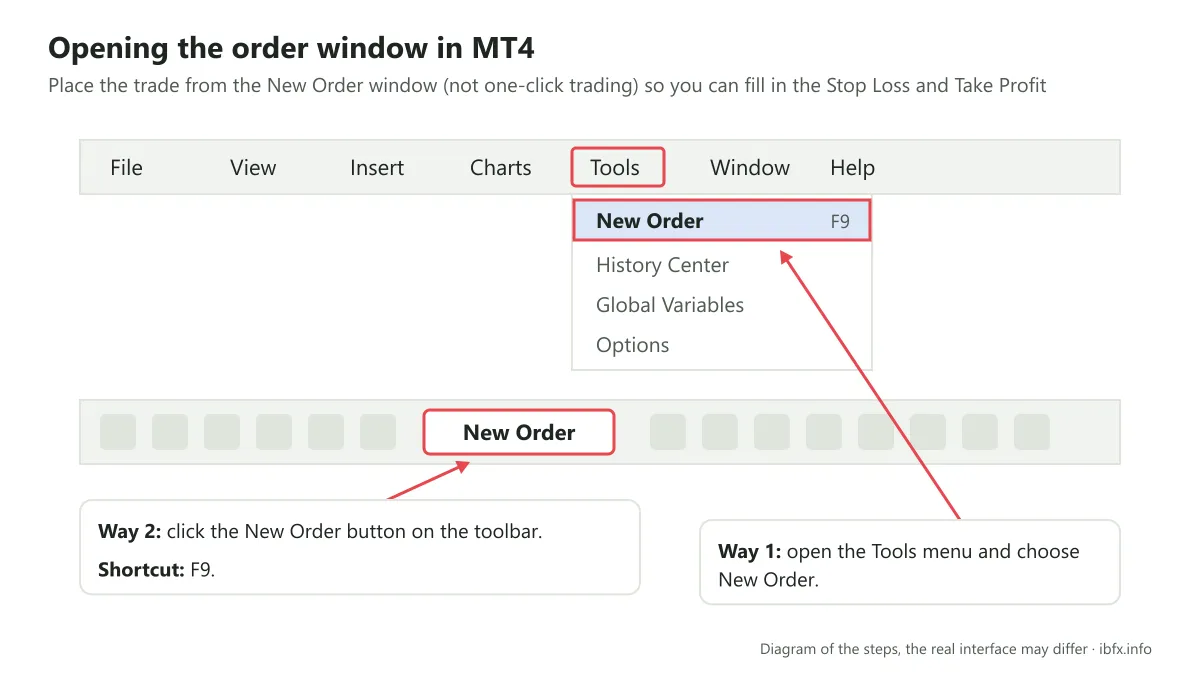
Go to Tools, choose New Order, or click the New Order button on the toolbar directly, as in the image below:
The screen brings up the order window, like this:
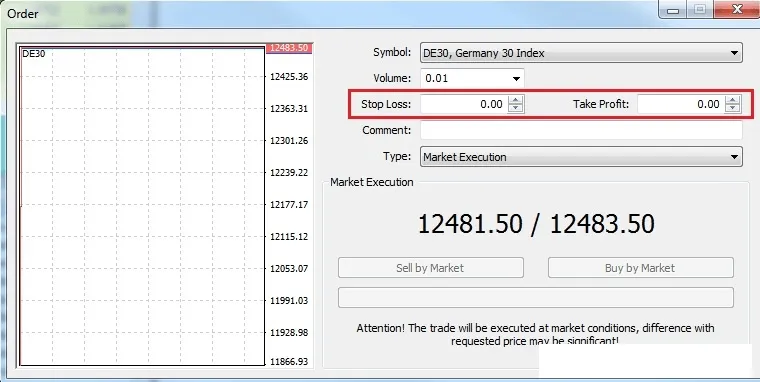
Here you choose the volume, the order type, the take profit and the stop loss too.
In the Stop Loss and Take Profit boxes you only have to enter a suitable stop loss and take profit price. On a Buy order, the take profit price has to be higher than the price of the order and the stop loss lower; on a Sell order it is the other way around.
Setting a take profit for a position that is already open, a trade already running
If for some reason you did not set the stop loss and the take profit right from the start, or you did set them but need to change them, you can edit them perfectly well.
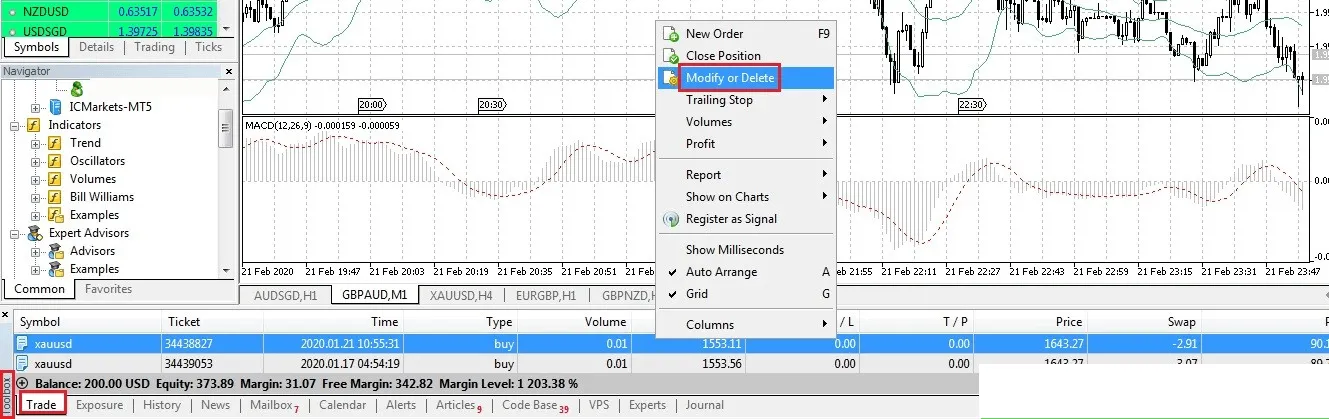
In the Trade tab, right-click the running trade whose take profit you want to set or change, then choose Modify or Delete
A settings window then appears, like this:
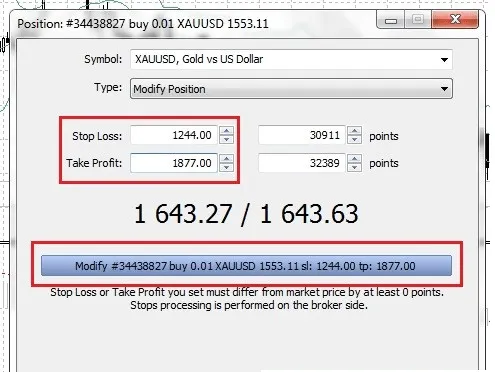
Here you edit the values of the take profit and the stop loss; you can enter a specific price or a number of pips, as in the image.
Once you have entered them, click the Modify…. line and you are done.
Where to place the take profit in forex trading
On any particular trade you will know the potential profit or the risk that the trade may bring. That “knowing”, though, does not come out of nowhere, and nor can you “pick at random” some price for the take profit or the stop loss: it all depends on the strategy or the risk management technique you are using.
Setting the take profit from technical analysis tools
A trader’s strategies or trading systems will point out the places where profit can be taken, and usually those are the signals produced by the technical analysis tools used in that strategy or trading system.
Within this article we will introduce you to a few analysis tools that give usable take profit signals in forex.
- The trendline and the price channel
Read:
- What is a trendline? How to draw one correctly
- What is a price channel? How to identify the trend with a price channel
In an uptrend or a downtrend, the 2 trendlines of the price channel act as the support and resistance levels of that trend. From those support and resistance levels, a trader can not only find a good entry point but also work out where the profit can be taken.
Example:
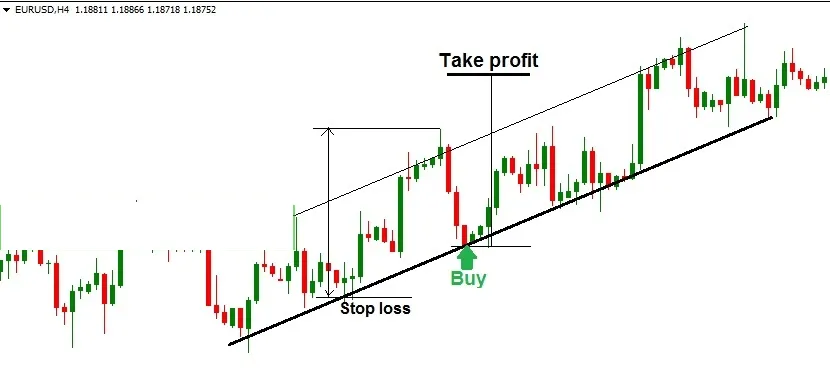
In a strategy that uses the price channel to find the entry point and the take profit, you can go about it like this:
- Enter when price reaches the lower trendline (the support line) and starts to move up
- Measure the distance from the most recent low to the most recent high before it, and set the take profit at a point that distance away from the entry point. The reason you can take profit this way is that if the strength of the trend holds steady, the next leg up may have a similar size. Another, simpler way is to take profit near the upper trendline of the price channel.
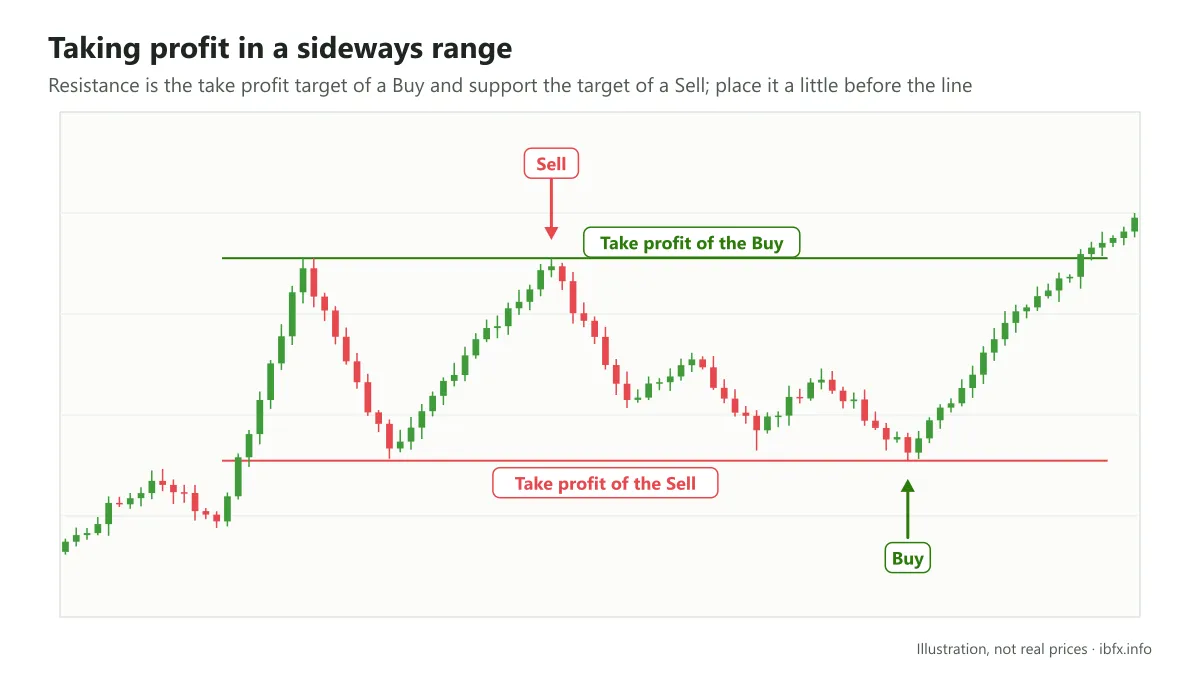
In a sideways trend, working out where to take profit is even easier. The upper trendline acts as a resistance line and the lower trendline as a support line of that sideways trend. The take profit price is placed near the support line for a Sell order and near the resistance line for a Buy order (place it a little before the line, because price can turn around before it reaches the line exactly).
Example:
- The Fibonacci Extension
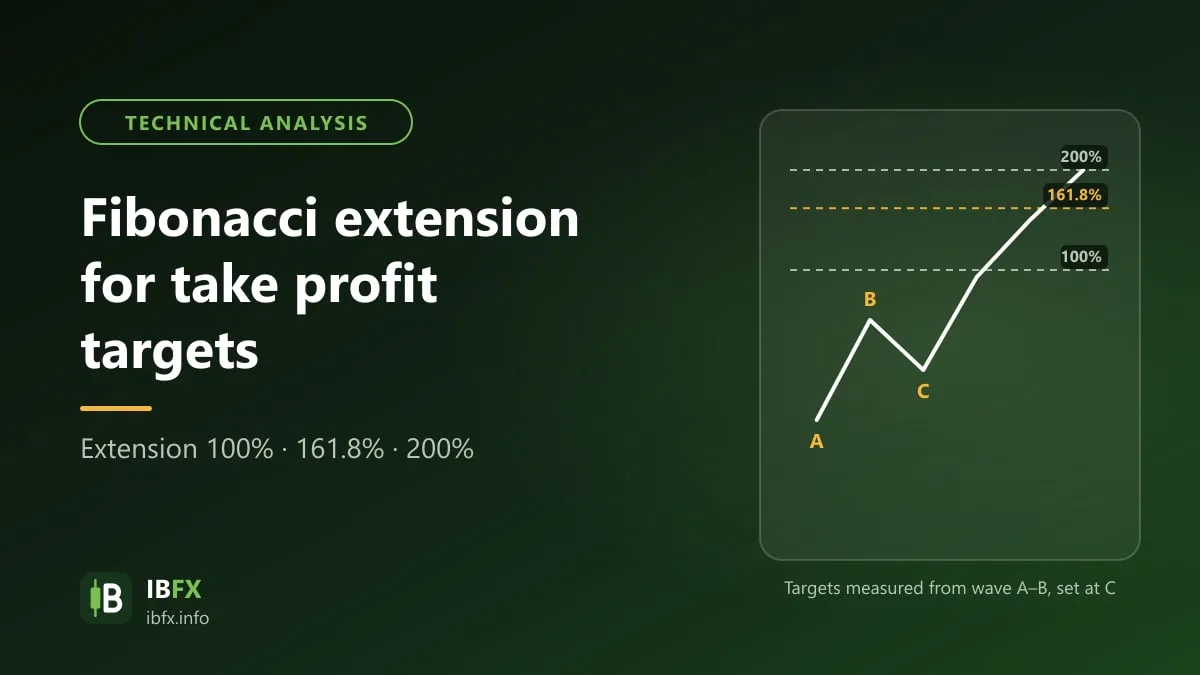
The Fibonacci Extension is a common tool for working out where to take profit.
If you have not read about the Fibonacci Extension, you can look at the article on how to use the Fibonacci Extension to take profit.
Example:
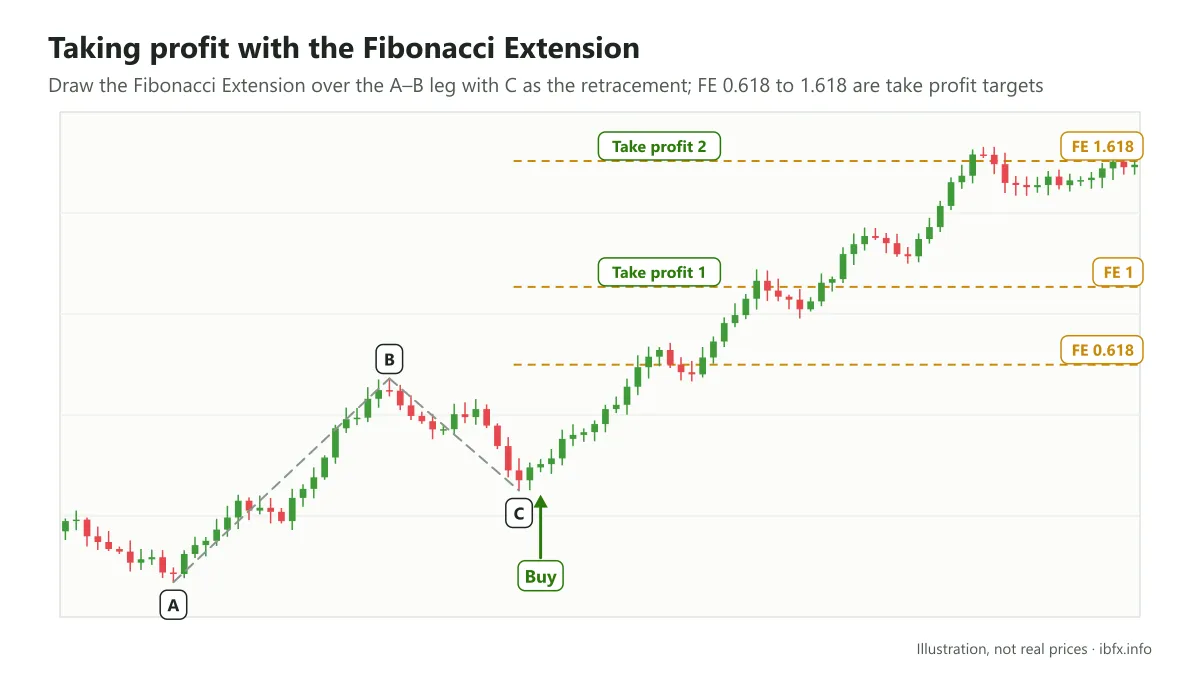
In a strategy that uses the Fibonacci Extension, you can pick one of the FE levels for the take profit, and the FE levels worth considering run from 0.618 to 1.618
- Price patterns
The price pattern (chart pattern) is one of the strong tools for working out the market trend and a good entry point in the price action school of analysis.
Another particular point is that most price patterns also give the trader a usable take profit signal.
Within this article we will introduce you to some of the most common price patterns in technical analysis, such as the Triangle, the Rectangle, the Double Top and the Head and Shoulders.
Example 1: the Triangle pattern
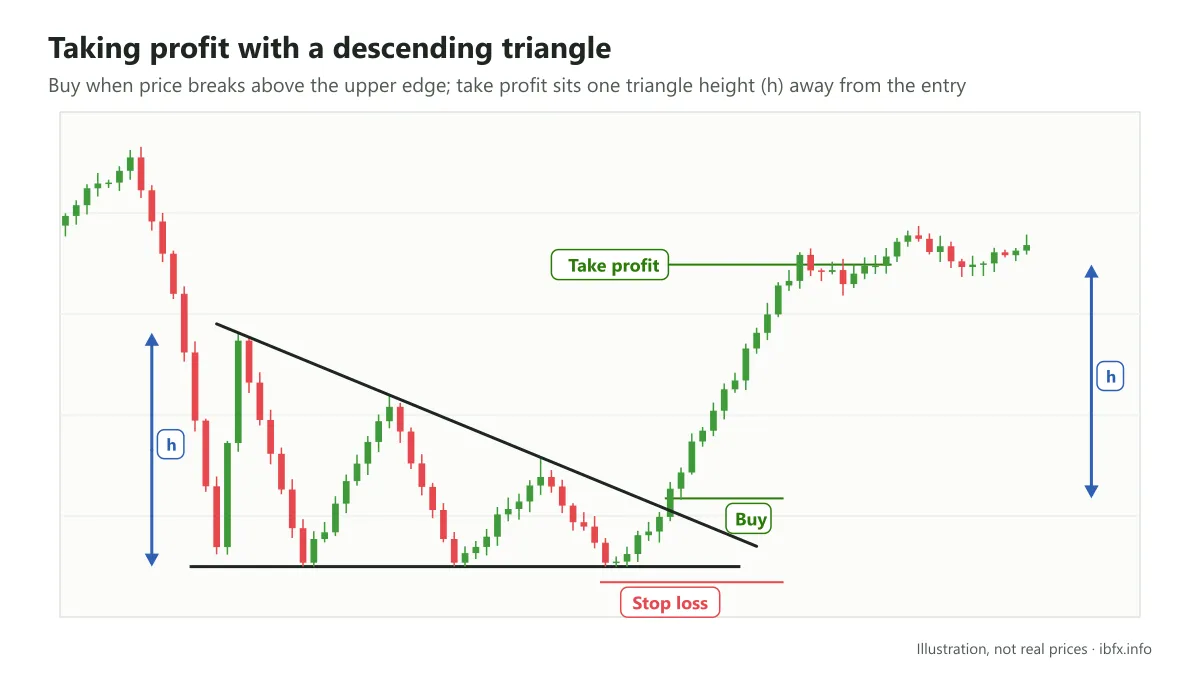
The descending triangle pattern
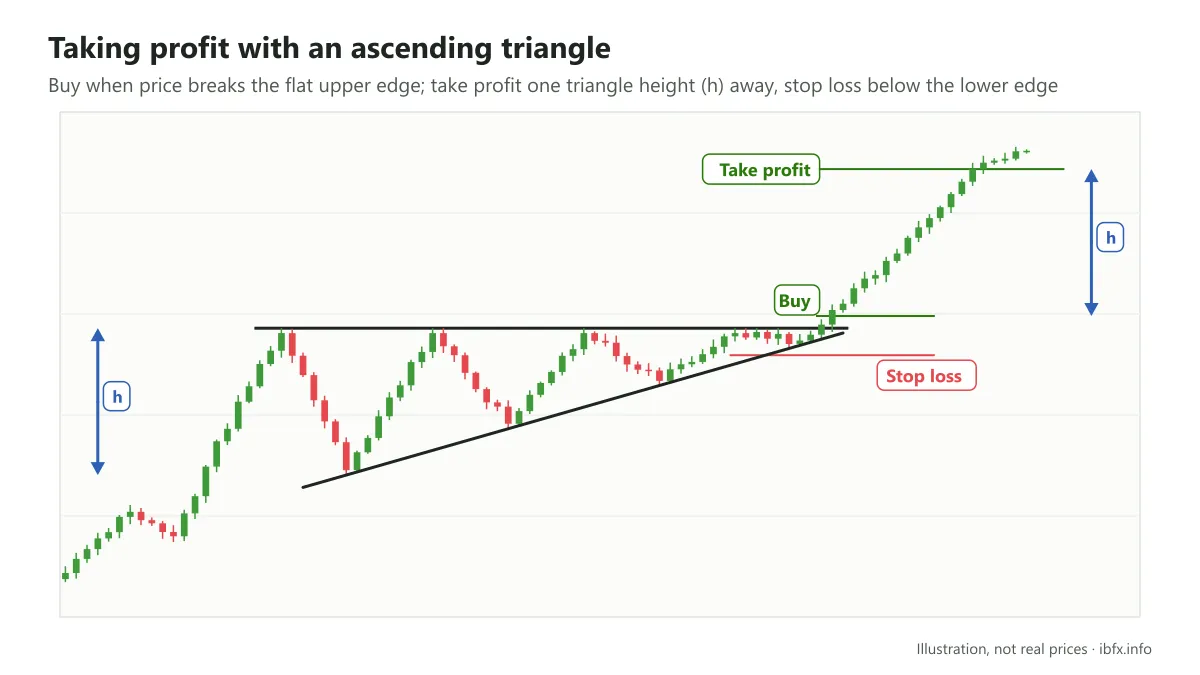
The ascending triangle pattern
In a trading strategy that uses the triangle pattern, the take profit point is the point one triangle height away from where you entered.
Example 2: the Rectangle pattern
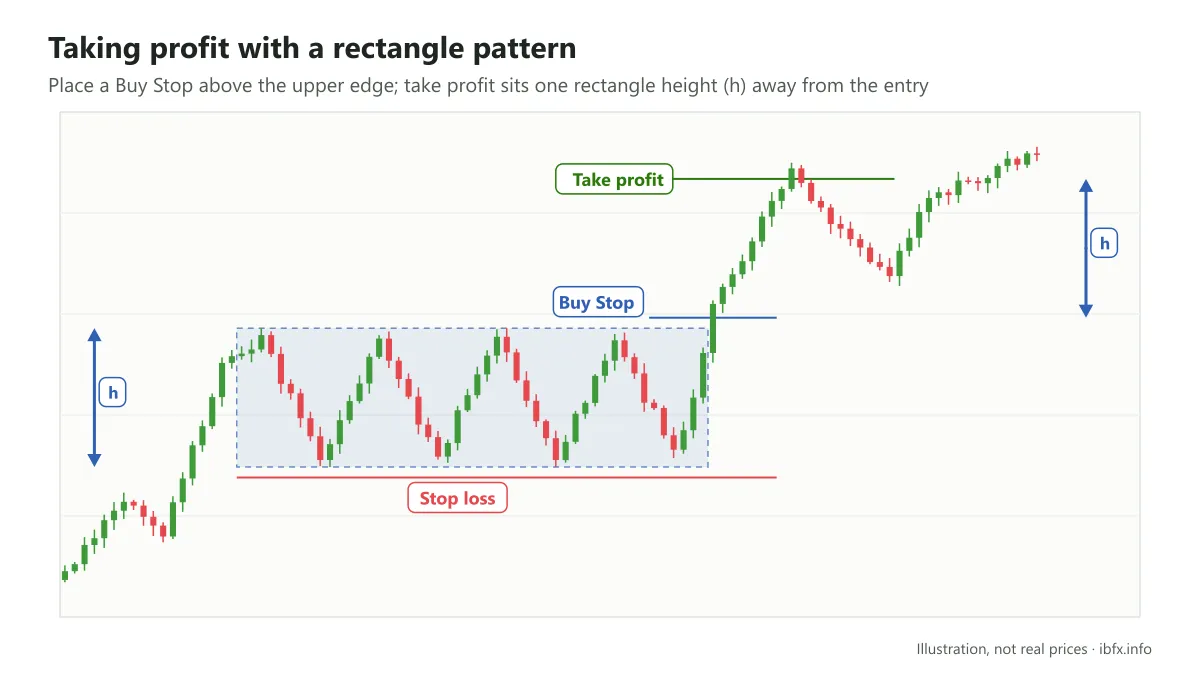
As with the Triangle pattern, the take profit point in the Rectangle pattern is the place one rectangle height away from the entry point.
Example 3: the Double Top pattern
See the article on the double top and double bottom patterns for more on how to trade this pattern.
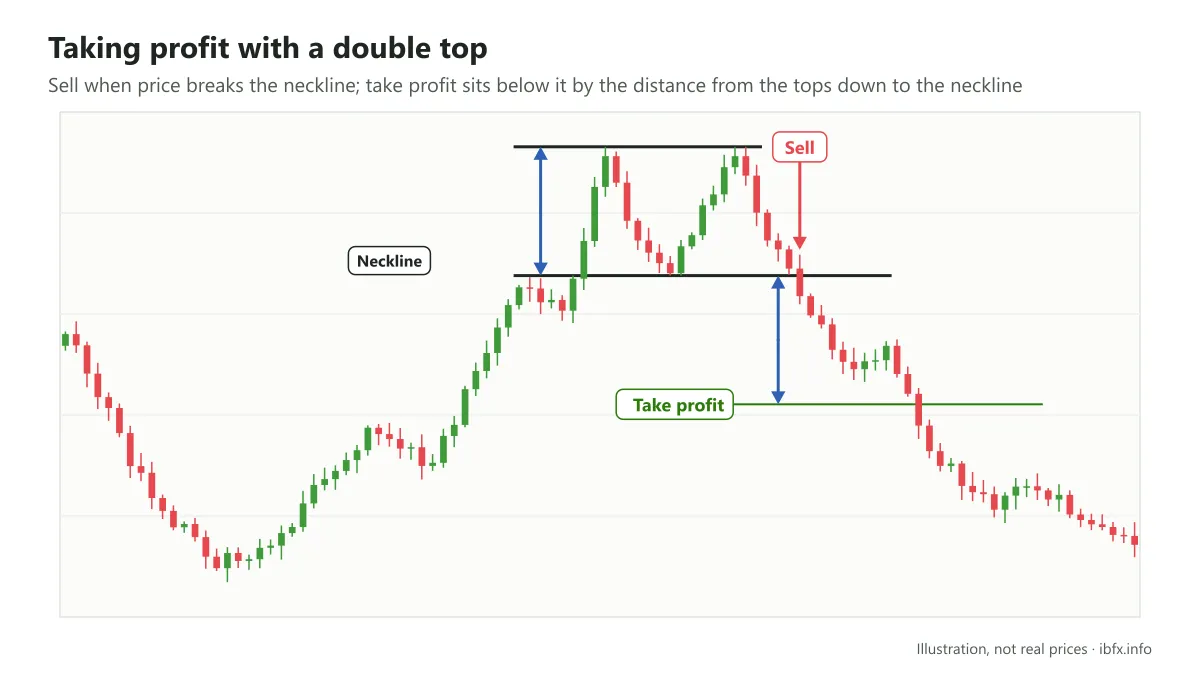
The take profit point in this strategy is the place below the neckline by a distance equal to the distance from the central low up to the highest price of the 2 tops.
Example 4: the Head and Shoulders pattern
Read more about this chart pattern in the article on the head and shoulders pattern and its inverse
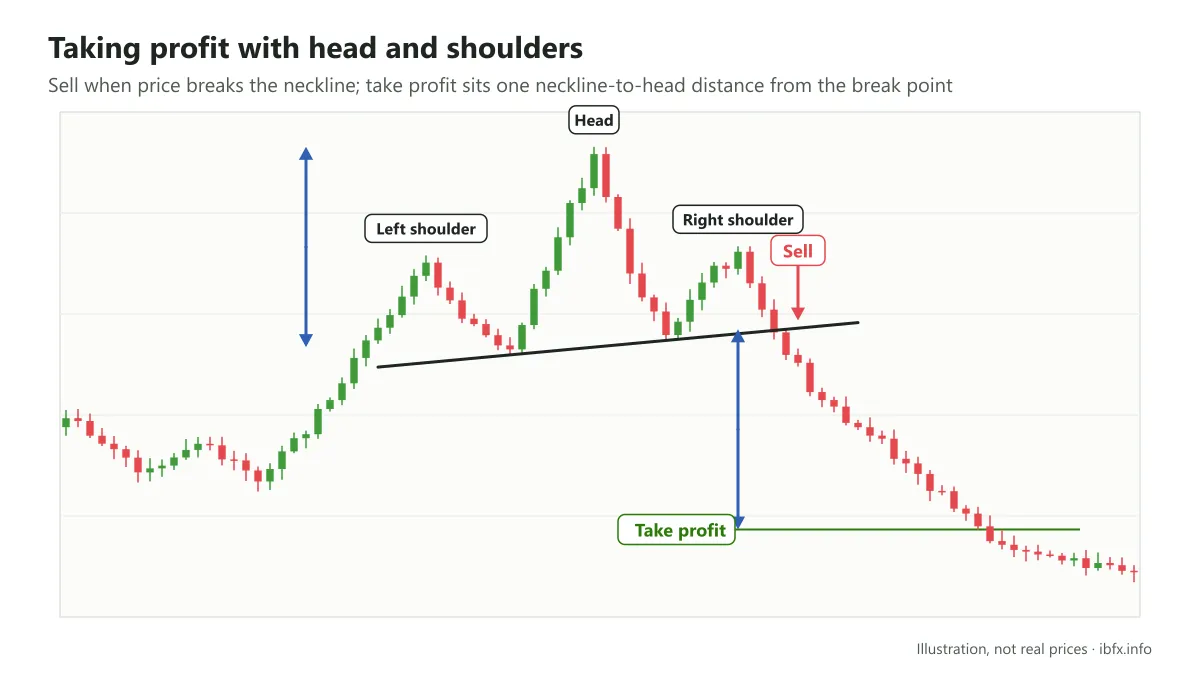
In the Head and Shoulders pattern, you can take profit at the place one neckline-to-head distance away from the break point (the entry point) on the neckline.
Setting the take profit from money management and risk management techniques.
One of the ways of setting the take profit by this method is to use the Risk:Reward ratio (the ratio of risk to reward).
Here, the risk is measured by the distance from the entry point to the stop loss and the reward by the distance from the entry point to the take profit.
If your trading strategy does not give any take profit signal at all, when you trade the news for instance, you can pick a sensible Risk:Reward ratio and work out the take profit point from it.
Suppose your trade has a stop loss of 30 pips and you expect this trade to reach a Risk:Reward ratio of 1:2, so you set the take profit at 60 pips.
Note: although you can use an expected Risk:Reward ratio to work out the take profit, if your strategy can work out both the stop loss and the take profit and those 2 give a low Risk:Reward ratio, 1:0.8 for instance, then you usually should not take the trade, unless your system has been tested and has a high enough win rate. And you must absolutely never stretch the take profit to reach the Risk:Reward ratio you wanted in that situation.
We hope that through what we have shared in this article you now understand the take profit tool better, a trading rule that no forex trader can do without. The examples of how to set a take profit that we have given you in this article are not all of them, but they will be useful pointers so that you can use this tool well.
Be strict with yourself and follow your own trading plan.